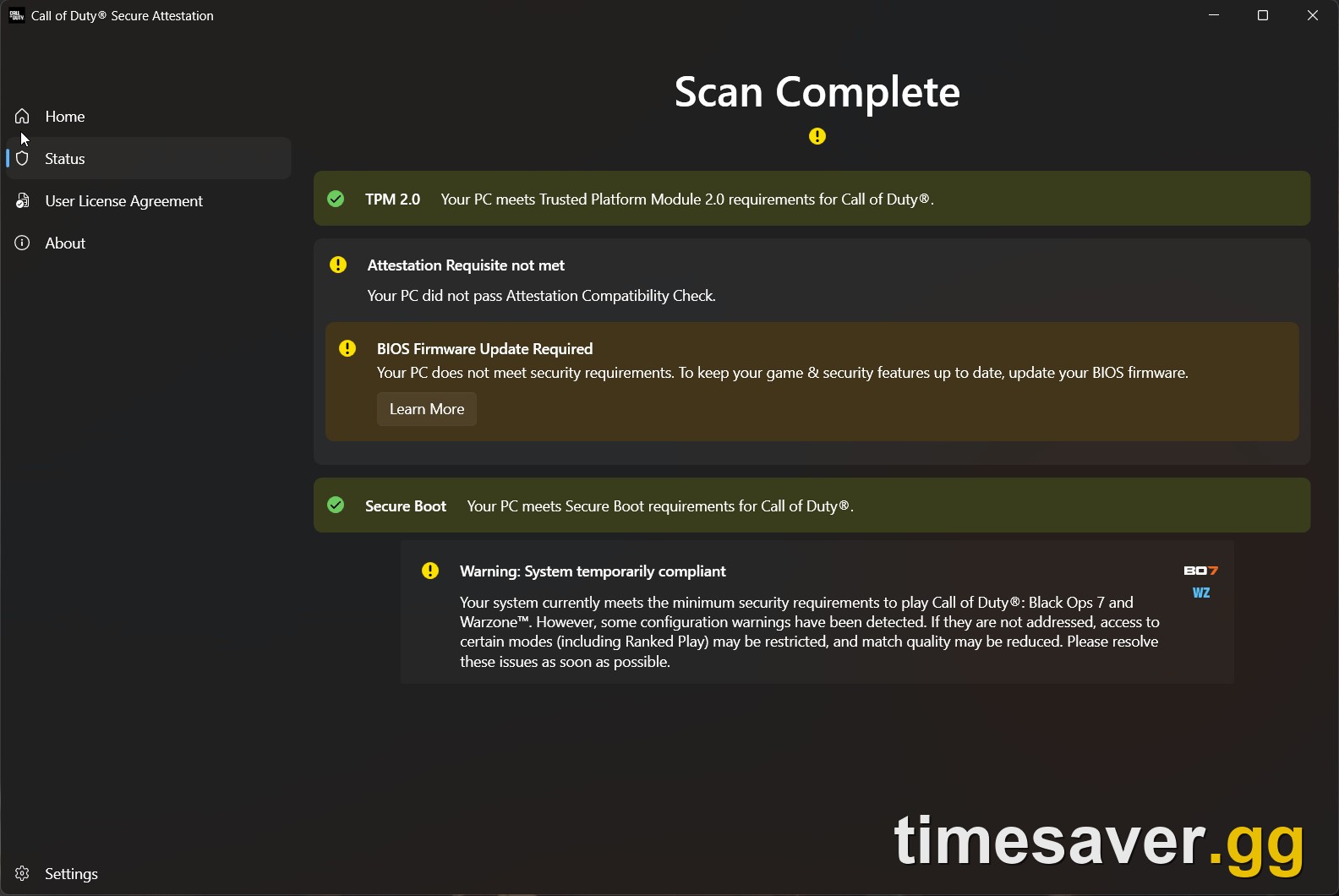
Quick answer (TLDR): "New Key Failed to Be Generated" (with "Attestation Requisite Not Met" and "BIOS Firmware Update Recommended") means RICOCHET Anti-Cheat's Remote Attestation could not generate a valid security key for your PC — even when TPM 2.0 and Secure Boot already show as ON. The problem is almost never the game and almost never a "banned" account. In order, the fixes that actually clear it: (1) run the official Call of Duty Secure Attestation Wizard (v1.1.3) to see exactly what fails; (2) re-enroll your Secure Boot keys in BIOS (Clear keys → Install Default keys) — "Enabled" alone isn't enough, the platform keys have to be loaded; (3) update your motherboard chipset drivers and clear/re-provision the TPM (back up your BitLocker key first); (4) confirm the TPM is attestation-ready with `tpmtool getdeviceinformation`; (5) flash the latest BIOS and disable CSM; and only as a last resort, fix the Intel PTT certificate chain. Full step-by-step below. This is spiking during the Modern Warfare 4 open beta (August 28 – September 1) because a fresh install triggers the attestation check on thousands of PCs at once. For a full guide, see COD HQ not loading fix. For more context, check out the HUENEME-NEGEV networking failed to start guide.
If you fired up the Modern Warfare 4 beta, Black Ops 7, or Warzone and got hit with "Secure Attestation Failed – New Key Failed to Be Generated," "Attestation Requisite Not Met," or "BIOS Firmware Update Recommended" — and you already have TPM 2.0 and Secure Boot switched on — you are looking at the most confusing version of Call of Duty's PC security lockout. Everything reads "enabled," yet the game still won't let you in.
The good news: this is a solved problem, and the fixes below are the ones players are confirming right now on r/CODWarzone, r/modernwarfare4, and the ASUS ROG forums during beta weekend 2. This guide explains what the error actually means, why it fires even with your security settings on, and the exact order to fix it on both Intel and AMD systems — verified against Activision's official support documentation.

Call of Duty - Bot Lobby
Get bot lobby in 10 minutes
What does "New Key Failed to Be Generated" mean in Call of Duty?
It means RICOCHET Anti-Cheat tried to create a fresh attestation key for your PC and Microsoft's servers rejected the request. Unlike the older "just turn on TPM" checks, Call of Duty now uses Remote Attestation — your PC's security state is validated against Microsoft, not just read locally.
In Activision's own words from the RICOCHET update:
"RICOCHET Anti-Cheat uses Remote Attestation to help verify important PC security settings directly with Microsoft as part of our implementation of TPM 2.0."
— Call of Duty RICOCHET Anti-Cheat Update, callofduty.com/blog
That is the whole reason this error is different from a plain "TPM off" message. Your TPM can be present, your Secure Boot can say On, and the check can still fail — because the handshake that generates and signs a new key relies on a clean chain: a provisioned TPM, properly enrolled Secure Boot keys, matching firmware certificates, and an up-to-date Windows. Break any link and you get "New Key Failed to Be Generated."
Until you pass, the game restricts you the same way a full attestation failure does: Black Ops 7 typically limits you to Nuketown 24/7 and Warzone to Battle Royale Casual, or blocks the session entirely.
Why is this spiking during the MW4 beta right now?
Because the Modern Warfare 4 open beta runs August 28 – September 1, 2026, and a huge wave of players are installing a Call of Duty client for the first time in months on this weekend. A fresh install re-runs the attestation handshake from scratch, so PCs that "worked fine last season" — or that never enabled Secure Boot keys correctly — all trip the same error at once. It is not an MW4-specific bug; it is the standard TPM 2.0 / Secure Boot attestation system (added in Season 05, August 2025) catching a configuration gap on your machine.
The fixes, in the order that actually works
Work top to bottom and test the game after each step — most players are fixed by step 2 or 3 and never need the advanced certificate fix.
Fix 1 — Run the official Call of Duty Secure Attestation Wizard first
Before you touch BIOS, let Activision's own tool tell you what's wrong. The Call of Duty Secure Attestation Wizard (currently version 1.1.3, updated August 6, 2026) is a free diagnostic that checks TPM, Secure Boot, boot mode, and disk partition style in one scan.
- Download it from Activision's support page (search "Trusted Platform Module and Secure Boot for Call of Duty" on support.activision.com and scroll to "Download the Call of Duty Secure Attestation Wizard").
- Extract the `.zip`, then run `CODSecureAttestationWizard.exe`.
- Accept the terms, run the scan, and note exactly which requirement shows a red/failed status.
If the wizard says everything passes but the game still errors, the problem is the key generation / certificate layer, not your basic settings — go to Fix 2.
Fix 2 — Re-enroll your Secure Boot keys (the #1 real fix for this error)
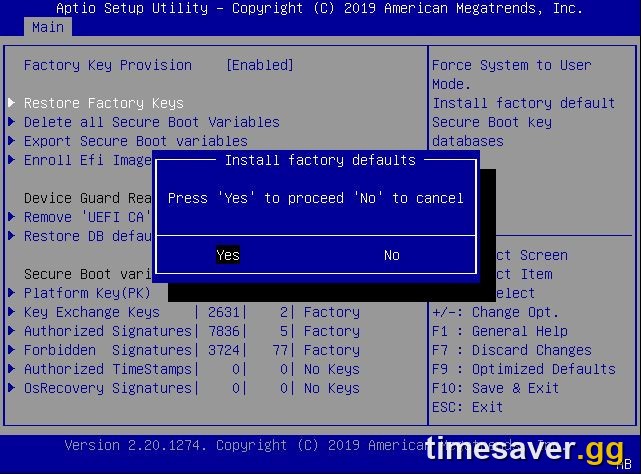
This is the fix most people are missing. Secure Boot showing "Enabled" is not enough — the platform keys have to be physically loaded into the motherboard, and after BIOS updates or Windows reinstalls they're often blank. This is what clears "New Key Failed to Be Generated" for the majority of players.
On most boards (steps named for ASUS; MSI/Gigabyte/ASRock are similar):
- Reboot and press Del or F2 to enter BIOS; press F7 for Advanced Mode.
- Go to Boot → Secure Boot.
- Set OS Type = Windows UEFI mode.
- Open Key Management (or Secure Boot Key Management).
- Click Clear Secure Boot Keys first, then Install Default Secure Boot Keys (sometimes "Restore Default…").
- Confirm Secure Boot Mode now reads User with keys active.
- Press F10 to save and exit, then launch Call of Duty.
| Symptom in BIOS | What it means | What to do |
|---|---|---|
| Secure Boot: Enabled, Mode: Setup | Keys are not enrolled | Install Default Secure Boot Keys → Mode flips to User |
| Secure Boot: Enabled, Mode: User | Keys enrolled correctly | Good — move to Fix 3 |
| OS Type: Other OS | Secure Boot enforcement off | Set to Windows UEFI mode |
Fix 3 — Update chipset drivers and clear/re-provision the TPM
If keys are enrolled and it still fails, the attestation key itself may be stale. Players who cleared this reported updating BIOS + re-generating the TPM keys + updating the chipset as the combo that finally passed.
- Update your motherboard chipset drivers from the manufacturer's site (AMD chipset / Intel Chipset Device Software). Outdated chipset packages are a common attestation blocker.
- Clear the TPM to force a fresh key: open `tpm.msc` (Windows + R → `tpm.msc`) → Clear TPM → reboot and follow the on-screen confirm at boot.
⚠️ Back up your BitLocker recovery key before clearing the TPM. If your drive is BitLocker-encrypted, clearing the TPM can lock you out without the recovery key. Check `manage-bde -status` in an admin terminal, and grab the key from your Microsoft account at account.microsoft.com/devices/recoverykey.
Fix 4 — Verify the TPM is actually "attestation-ready"
You can confirm the real state of your TPM instead of guessing. Open PowerShell as Administrator and run:
``` tpmtool getdeviceinformation ```
Look for these lines:
- TPM Present: True and TPM Version: 2.0
- Ready For Attestation: True
- Is Capable For Attestation: True
- Clear Needed To Recover: False
If Ready For Attestation or Is Capable For Attestation shows False, your TPM/AIK isn't provisioned — redo Fix 3 (clear TPM + reboot) or update BIOS in Fix 5. If Clear Needed To Recover: True, clear the TPM (after backing up BitLocker).
Fix 5 — Flash the latest BIOS and disable CSM
Older firmware — especially AMD fTPM versions in the 3.x range — is known to fail the attestation check outright.
- Flash the latest stable BIOS for your exact motherboard model from the manufacturer (not a random Intel ME/firmware package).
- After flashing, disable CSM (Compatibility Support Module) — CSM forces legacy boot and breaks Secure Boot enforcement.
- Confirm BIOS Boot Mode = UEFI (not Legacy) and your Windows disk is GPT, not MBR. Check with Windows + R → `msinfo32`: BIOS Mode should read UEFI and Secure Boot State On.
- Re-run the Secure Attestation Wizard from Fix 1 to confirm.
Fix 6 (last resort) — The Intel PTT certificate chain
A small number of Intel-PTT systems fail with a certificate-chain error (0x80190190 / 0x10008) even after every step above, because Windows is using mismatched Intel PTT intermediate certificates. The advanced fix is to extract the correct certificates from your own TPM's NV storage and install them into the Windows Intermediate Certification Authorities store.
⚠️ Do not download certificates from anyone else's PC, and don't reinstall Windows or flash random firmware just to try this. Only pursue the certificate fix if the wizard passes, keys are enrolled, the TPM is attestation-ready, and you're still stuck. For most players, Fixes 2–3 solve it. If you reach this point, it's often faster to wait out a Microsoft Azure Attestation (MAA) server hiccup and retry, or contact Activision Support with your wizard results.
What to do once you're back in
Losing a full evening of beta weekend 2 to a BIOS lockout stings — and the MW4 beta only runs through September 1, so every hour counts toward its unlock rewards and the Black Ops 7 Season 5 grind. If you'd rather spend your remaining time playing instead of chasing XP:
Skip the grind and jump straight to the fun once your PC is back online:
- CoD Account & Weapon Leveling — hit max weapon and account level fast without re-grinding what the beta reset. Skip the grind · pro players.
- CoD Bot Lobbies — easy lobbies to level weapons and complete camo challenges in a fraction of the time. Easy lobbies · level fast.
- CoD Camo Unlocks (BO7) — mastery camos done for you, fast and secure. Mastery camos · fast · secure.
- All Call of Duty services — the full menu across BO7, Warzone, and MW4.

Call of Duty - Ranked Boost
Get ranked boost in 10 minutes
Related Call of Duty fix guides
- If your settings are genuinely off, start with the base guide: Warzone & Black Ops 7 'Failed Attestation Status' Fix.
- Seeing "BIOS Firmware Update Required" specifically in MW4: Modern Warfare 4 'BIOS Firmware Update Required' Fix.
- Still failing after TPM 2.0 and Secure Boot are on: Advanced Attestation Fixes.
- New to the beta this weekend: MW4 Open Beta — How to Play Free.
Frequently Asked Questions
Is "New Key Failed to Be Generated" a ban? No. It's a hardware-attestation failure, not an account penalty. RICOCHET couldn't generate a valid security key for your PC, so it restricts your playlists until the check passes. Nothing is wrong with your account — fix the Secure Boot key enrollment or TPM state and you're back in.
Why does it fail when TPM 2.0 and Secure Boot are already ON? Because "On" only means the features are toggled, not that the underlying chain is clean. The most common cause is that your Secure Boot keys aren't enrolled (Secure Boot Mode shows "Setup" instead of "User"), so the platform can't sign a new attestation key. Re-enrolling the keys (Fix 2) resolves the majority of these cases. Outdated chipset drivers, an unprovisioned TPM, or a stale BIOS can cause it too.
Do I need to clear my TPM, and is that safe? Only if Fixes 1–2 don't work, and only after you back up your BitLocker recovery key. Clearing the TPM forces a fresh attestation key, which fixes a stuck key generation — but on a BitLocker-encrypted drive it can lock you out without the recovery key. Grab the key from account.microsoft.com/devices/recoverykey first.
Which CPUs support the required TPM 2.0? Per Activision, Intel 8th Gen or newer (using Intel PTT) and AMD Ryzen 2000 series or newer (using AMD fTPM), or any system with a discrete TPM (dTPM) chip. You also need Windows 10 version 22H2 or later, or any version of Windows 11.
Do I have to do all this just for the MW4 beta? Yes if you're on PC — TPM 2.0 and Secure Boot are required to play Modern Warfare 4, Black Ops 7, and Warzone (they're not required for older Call of Duty titles). The upside: fix it once and you're cleared for the full MW4 launch, not just the beta.
The Secure Attestation Wizard says I pass, but the game still errors. Now what? That points to the key/certificate layer, not your basic settings. Re-enroll Secure Boot keys (Fix 2), clear and re-provision the TPM (Fix 3), and confirm `tpmtool getdeviceinformation` shows Ready For Attestation: True. If it still fails on an Intel-PTT board with code 0x80190190, it's the certificate-chain edge case (Fix 6) — or a temporary Microsoft attestation server issue, so wait and retry.