The Modern Warfare 4 beta is live on PC — and for a big chunk of players it won't even reach the main menu. Instead you get a hard wall: "BIOS firmware update required" (sometimes shown as a TPM/Secure Boot security check or Failed Attestation Status). The cruel part? Most people hitting it have already updated their BIOS and still see the message.
This full loadout costs $32.61 on Timesaver and is delivered within 4 hours — see all Call of Duty MW4 prices.
Skip the grind in Call of Duty
| Item | Price | Delivery | Buy |
|---|---|---|---|
| Bot Lobby MW4 | $12.99 | 4 hours | Buy now |
| MW4 Account Leveling | $16.20 | 4 hours | Buy now |
| MW4 Weapon Leveling | $3.42 | 2 hours | Buy now |
Here's the short version: this is not a bug you can wait out, and reinstalling MW4 won't touch it. It's RICOCHET Anti-Cheat refusing to launch until it can verify two hardware security features — TPM 2.0 and Secure Boot — at the firmware level. If either one is off, mis-provisioned, or reporting an outdated version, you're locked out of the beta entirely. Below is the exact order to fix it, including the specific reason your "already updated" PC still fails.
Call of Duty - Bot Lobby
Get bot lobby in 10 minutes
Quick answer (TLDR)
- What it means: MW4's RICOCHET anti-cheat requires TPM 2.0 + Secure Boot enabled in your BIOS/UEFI. The "BIOS firmware update required" prompt appears when the game can enable-check TPM but reads it as missing, disabled, or an outdated firmware version.
- Fastest fix (works for most): Boot into BIOS → enable TPM 2.0 (AMD = fTPM, Intel = PTT/Intel Platform Trust Technology) → enable Secure Boot → full shutdown (not restart) → relaunch.
- "Already updated but still failing"? The #1 cause is an outdated fTPM/AGESA firmware on AMD AM4 boards (Ryzen 3000/5000), or a missing TPM Endorsement Key (EK) certificate. Fix = flash the latest board BIOS, then clear/re-provision the TPM (toggle it off → boot → toggle it back on).
- Secure Boot option greyed out? Your Windows is installed in Legacy/MBR mode. You must be in UEFI/GPT mode first (convert with `mbr2gpt`), and CSM must be disabled.
- No BIOS access? If your PC genuinely lacks TPM 2.0 hardware, the beta will not run — there is no software workaround.
Straight from Activision Support: "If you enabled TPM 2.0 and are still getting prompted in Call of Duty, it's possible your motherboard requires a BIOS firmware update." — support.activision.com
Two things are worth knowing before you dive in. First, both settings are mandatory — enabling TPM but leaving Secure Boot off (or vice-versa) still fails. Second, this is the same security stack that already gates Black Ops 7 and Warzone; if you fixed it there, MW4 uses the exact same requirement. Our full deep-dive on the AMD side lives in the Warzone & BO7 'Failed Attestation Status' fix, and the BIOS Update Required still-showing guide covers the stubborn Warzone/BO7 variant.
Why does Modern Warfare 4 say "BIOS firmware update required"?
RICOCHET Anti-Cheat runs a secure attestation check at launch. It asks your motherboard's firmware to cryptographically prove that TPM 2.0 and Secure Boot are active and trustworthy. The message is misleading — it doesn't always mean your BIOS version is old. It fires in any of these cases:
- TPM is disabled in BIOS (very common on prebuilts and AMD boards where fTPM ships off).
- Secure Boot is disabled or unavailable because you're booting in Legacy/CSM mode.
- TPM is enabled but the firmware version is flagged as outdated — RICOCHET treats older AMD fTPM implementations as untrusted.
- The TPM Endorsement Key (EK) certificate is missing — the chip is present but was never properly provisioned, so attestation has nothing to sign against.
- A TCG Event Log failure — Windows recorded a boot-measurement error that the game can't verify.
That last group is exactly why an "already updated" PC keeps failing: the BIOS number on screen is current, but the TPM's internal firmware or provisioning state isn't. Activision's own support page notes that TCG Event Log failures are cleared by "restart[ing] your computer and apply[ing] the latest Windows update" — a step most players skip.
How to fix it — the exact order
Work top-to-bottom. Most people are fixed by Step 2; the "already updated" crowd needs Steps 3–4.
Step 1 — Confirm what your PC is actually missing
Before touching BIOS, check the current state in Windows:
- Press `Win + R`, type `tpm.msc`, press Enter. Look for "The TPM is ready for use" and Specification Version 2.0. If it says "Compatible TPM cannot be found," TPM is off in BIOS.
- Press `Win + R`, type `msinfo32`, press Enter. Check BIOS Mode = UEFI (not Legacy) and Secure Boot State = On.
If BIOS Mode shows Legacy, jump to Step 5 first — Secure Boot literally cannot turn on until you're in UEFI mode.
Step 2 — Enable TPM 2.0 and Secure Boot in BIOS
Restart and enter BIOS/UEFI (usually `Del` or `F2` at boot; laptops often `F2` or `F10`).
- AMD motherboards: find AMD fTPM (sometimes under Advanced → AMD CBS → Trusted Computing) and set it to Enabled / Firmware TPM.
- Intel motherboards: find PTT (Intel Platform Trust Technology) or Intel Trusted Execution and set it to Enabled.
- Secure Boot: under the Boot or Security tab, set Secure Boot = Enabled and OS Type = Windows UEFI Mode. If it's greyed out, disable CSM (Compatibility Support Module) first, save, reboot, then re-enter and enable Secure Boot.
Save and exit. Then do a full shutdown, not a restart. A cold boot forces MW4 to re-read your platform state — players consistently report that a normal restart leaves the error in place while a full power-off clears it.
Step 3 — "Already updated but still failing": update the board BIOS and AGESA
If TPM and Secure Boot both show enabled but MW4 still throws the error — especially on a Ryzen 3000 or 5000 CPU (AM4 socket) — the root cause is almost always outdated fTPM firmware bundled in an old AGESA version. Symptoms include the error code `0x80070490`.
- Go to your motherboard manufacturer's support page (not the CPU maker's).
- Download the latest BIOS — look for release notes mentioning AGESA and fTPM. Many AM4 boards shipped a specific update to fix RICOCHET attestation.
- Flash it (BIOS Flashback or the in-BIOS updater), then re-enable fTPM + Secure Boot as in Step 2.
This is the single most common fix for the "my BIOS is current" case, because the board BIOS was current but the AGESA/fTPM microcode inside it was not.
Step 4 — Clear and re-provision the TPM (fixes the missing EK certificate)
If the chip is present but attestation still fails, the TPM's Endorsement Key may not be provisioned. Two community-proven approaches:
- The toggle trick: reboot into BIOS, disable TPM/fTPM, save and boot to Windows, then reboot back into BIOS and re-enable it. This forces a fresh provisioning pass. Multiple players report this alone clears the message.
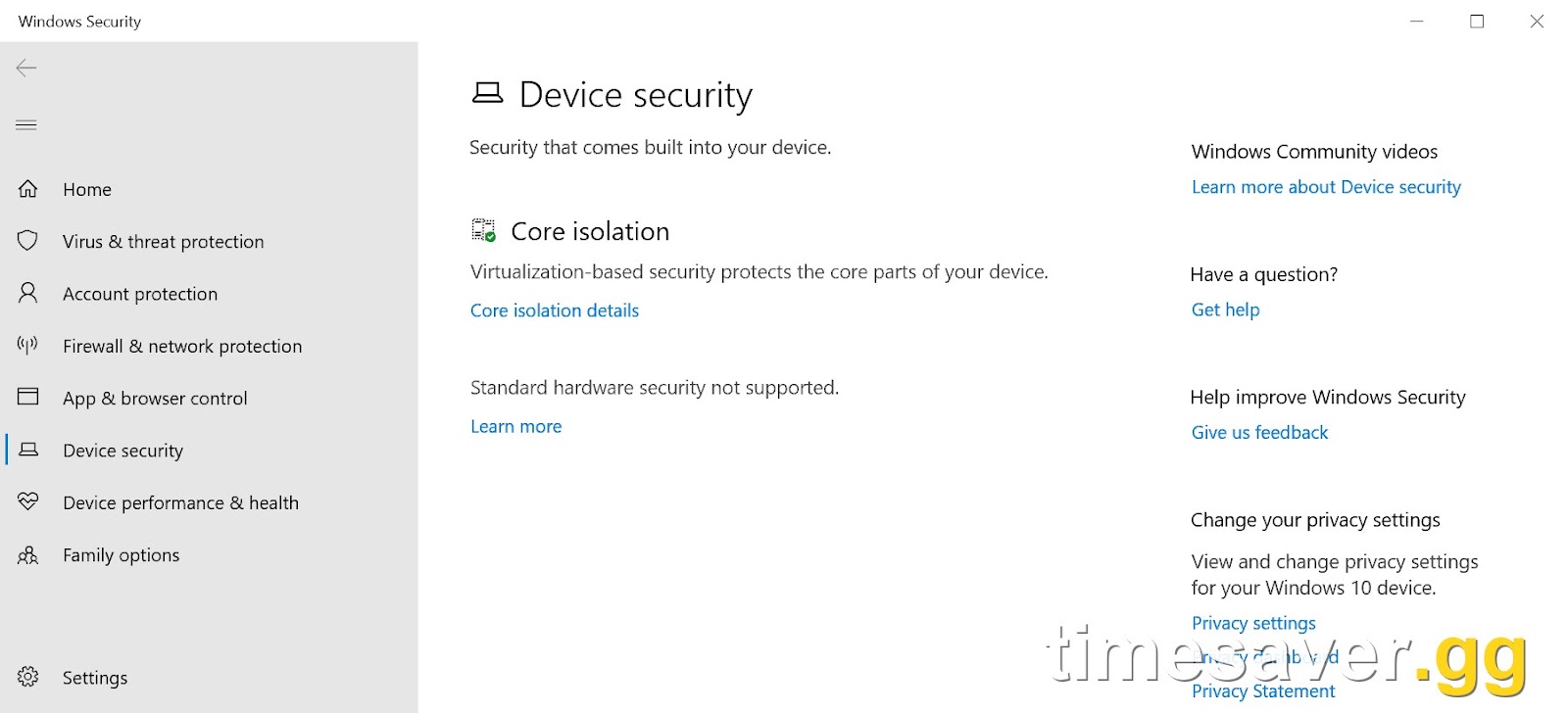
- Clear TPM in Windows: open Windows Security → Device Security → Security processor details → Security processor troubleshooting → Clear TPM, then reboot. (This wipes TPM-stored keys — de-link BitLocker first if you use it.)
On some systems the EK certificate only re-provisions after installing the latest chipset/management-engine drivers (Intel ME drivers on Intel boards) and running Windows Update to completion.
Step 5 — If Secure Boot is greyed out: convert Legacy/MBR to UEFI/GPT
Secure Boot requires a GPT disk booting in UEFI mode. If `msinfo32` showed Legacy, convert without reinstalling Windows:
- Open Command Prompt as admin and run `mbr2gpt /validate /allowFullOS`. If it validates, run `mbr2gpt /convert /allowFullOS`.
- Reboot into BIOS, disable CSM, set boot mode to UEFI, enable Secure Boot, save.
If validation fails, back up your data before attempting a manual conversion.
Step 6 — Run the Secure Attestation Wizard and finish Windows Update
Activision provides a Secure Attestation Wizard through the Call of Duty HQ / support flow that re-checks your configuration and reports the specific failing component. Run it after the steps above, then make sure Windows is fully updated and reboot — pending updates are a frequent last blocker.

Call of Duty - Ranked Boost
Get ranked boost in 10 minutes
Still stuck in the beta after fixing this?
Getting past the security wall is only half the battle during a beta launch window. If MW4 or Warzone then hangs, see Stuck on Loading Screen or Freezing fix, and if COD HQ won't load your account, the You Are Not Signed In to a Profile fix covers that. Once you're finally in, the fastest way to unlock beta rewards and blueprints is our Modern Warfare 4 beta level-up guide.
Do it for me — MW4 beta leveling & lobbies
Fixed the BIOS wall but short on time to grind the beta? Our pro players can level your account and unlock beta rewards while you skip the queue.
Skip the grind and jump straight to the good stuff:
- CoD Account & Weapon Leveling — skip the grind, done by pro players
- CoD Bot Lobbies — easy lobbies, level fast
- All Call of Duty services — everything in one place
Frequently Asked Questions
Can I buy this loadout instead of farming it? Yes: this loadout costs $32.61 on Timesaver, and a Timesaver pro completes it by hand within 4 hours. How handover works and what happens if something goes wrong: account safety.
Why does Modern Warfare 4 say "BIOS firmware update required" when my BIOS is already up to date? Because the message refers to your TPM firmware and Secure Boot state, not just the BIOS version number. The most common causes on an "updated" PC are an outdated AMD fTPM/AGESA microcode (Ryzen 3000/5000), a missing TPM Endorsement Key certificate, or a TCG Event Log error. Flash the latest board BIOS that mentions AGESA/fTPM, then clear and re-provision the TPM.
Is TPM 2.0 and Secure Boot actually required to play the MW4 beta? Yes. Both are mandatory for RICOCHET Anti-Cheat on PC — the same requirement already used by Black Ops 7 and Warzone. If your hardware genuinely doesn't support TPM 2.0, the beta will not launch and there is no software bypass.
Why is the Secure Boot option greyed out in my BIOS? Because Windows is installed in Legacy/MBR mode. Secure Boot needs a GPT disk booting in UEFI mode with CSM disabled. Convert without reinstalling using `mbr2gpt /convert /allowFullOS`, then enable UEFI mode and Secure Boot in BIOS.
Do I need to restart or fully shut down after enabling TPM and Secure Boot? Do a full shutdown (power off), then boot fresh — not a restart. A cold boot forces the game to re-read your platform's security state; a soft restart frequently leaves the error showing even after the settings are correct.
Will reinstalling Modern Warfare 4 fix the BIOS firmware error? No. The check runs against your motherboard firmware and TPM, not the game files. Reinstalling MW4 does nothing — you have to fix TPM 2.0 and Secure Boot at the BIOS level.
What is error code 0x80070490 in Call of Duty? It's tied to a TPM Endorsement Key or TCG Event Log problem — the chip is present but attestation can't verify it. Update the board BIOS/AGESA, clear the TPM, install the latest chipset/management-engine drivers, and run Windows Update to completion.