"You can play Roblox on web browser now?" is the question r/roblox started asking this week, and the honest answer is: yes, but probably not you, and not yet. Roblox opened its official browser client on October 29, 2026, for creators testing their own games. The rollout to regular players comes after that, and it won't suit every laptop.
This guide covers how to play Roblox in a browser today, who qualifies for the Web Play beta, what your PC needs, which features are missing, and what the "no download" sites in your search results actually are.
Quick answer: Roblox Web Play is an official browser client, currently in a creators-only beta that opened on October 29, 2026. You can only launch games you own or have permission to test, in Chrome on Windows, macOS or Android, using the Play in Browser button in Creator Hub. Regular players can't use it on public games yet. Roblox is aiming to start a progressive rollout before the end of 2026, and the planned spec for that launch is 6GB of RAM and a 4-core 64-bit CPU. Until then, the Roblox app is the only official way to play public games.
Everything below comes from Roblox's Web Play beta announcement on the DevForum, staff replies in that thread, the RDC 2026 newsroom post and Roblox Help Center pages, all checked October 30, 2026. Web Play is changing daily, so treat this as a snapshot of the creator beta.
Not keen on the grind? Timesaver runs a Blox Fruits boosting service that covers fruits, awakenings and race progress on your own account.

Roblox - Blox Fruits Boost
Get any fruit, awakened and ready
Can you play Roblox in a browser right now?
Only in one specific case. If you own a published Roblox game, or you have the right permissions on a group-owned one, you can open that game in Chrome today. If you want to open Steal An Egg or Murder Mystery 2 in a tab, you can't, because the beta doesn't let you join games you don't own or test.
Here's who gets what, based on Roblox's own FAQ:
| Your situation | Web Play access today |
|---|---|
| You personally own the game | Yes, you're the only one who can test it |
| Group-owned game, you're the group owner | Yes |
| Group-owned game, you have edit permissions | Yes |
| Group-owned game, you're an early tester or playtester | Yes |
| You're a regular player on a public game | No, wait for the rollout |
The announcement states it in one line: "Web Play early access is now available for Creators only to test your games in Chrome." Calling it a "beta" makes it sound open. It's closer to a developer preview.

How do you play Roblox in a browser with Web Play?
If you do have a game, the official route takes two steps:
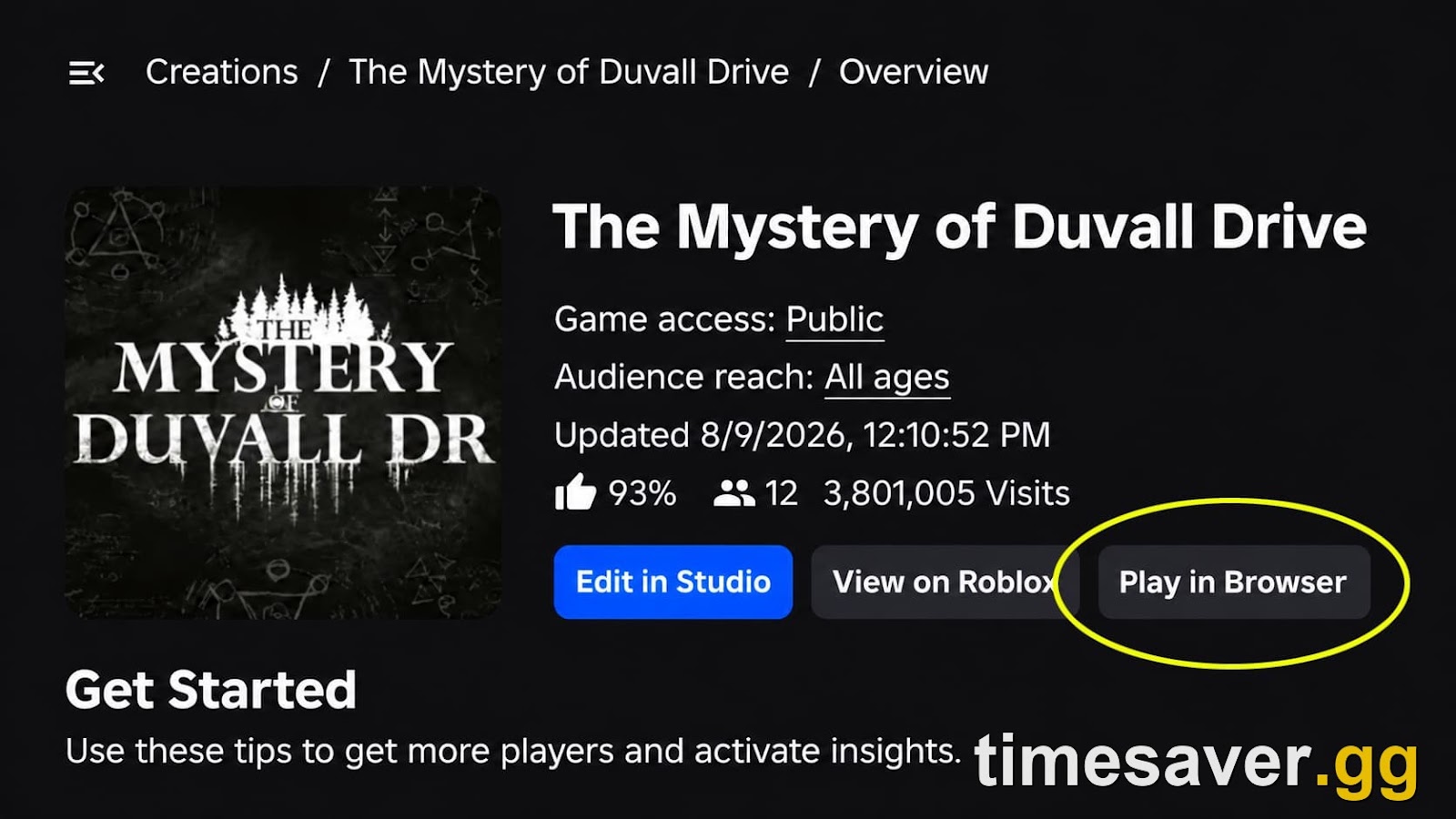
- Open your game in Creator Hub using Chrome.
- Click the Play in Browser button on the game's overview page.
That's the whole process. Expect the first launch to be slow, because Roblox lists "First load is slow as the app is downloaded" among its known issues. "No install" here means no installer, not no download. Your browser still has to fetch the client.
Three things save you time:
- Update Chrome first. Roblox warns that Chrome versions below v156 have a bug on x86 machines that can crash the game after about 5 minutes of play.
- Use stock Chrome with no extensions if it fails. Roblox staff asked one tester to confirm exactly that while debugging a load error, and suggested incognito mode and a hard refresh for a missing button.
- Don't panic over error 256. Roblox says it has "intermittently seen an error 256 and 'Engine failed to load' errors" and is still struggling to reproduce them reliably.
If you don't own a game, publishing one means using Roblox Studio. New games stay private to you by default, which is enough for this test, though you'd only be playing your own empty place.
When will Web Play open to all players?
Roblox's stated target is: "We're aiming to start a progressive rollout before the end of the year."
Read that wording carefully. It's a target for the start of a progressive rollout, so it doesn't promise that every account gets access by December 31. Roblox's own RDC line was bolder ("By the end of this year, players will be able to join a game in-browser on Chrome"), but the newer announcement is the one to plan around.
The timeline so far:
| Date | What happened | Source |
|---|---|---|
| Sept 11, 2026 | Web play previewed at RDC 2026 | Newsroom |
| Oct 27, 2026 | Device Trust API launched for Android and Web | DevForum |
| Oct 29, 2026 | Creator beta opens in Chrome | DevForum |
| Late 2026 (target) | Progressive rollout starts | Roblox FAQ |
When it arrives, the player experience should be simple. The newsroom post says you'll join "from a game's Experience Details Page", with "no app or install required", and that the web player lets people "click a link from anywhere (search, YouTube, X, an email from a friend, or a creator's social channel) and start playing instantly."
Two details are still missing. Roblox hasn't said whether you'll need to log in first, and it hasn't announced a date for browsers beyond Chrome, only "more browsers to follow." That also matters for this weekend: the Steal An Egg Jonas Brothers concert on October 31 and the finale of The Hollow both still need the app.
What are the Web Play system requirements?
Web Play is much hungrier than the app. Roblox isn't enforcing a minimum during the creator beta, but it published what it intends to require at the broader launch:
| Spec | Roblox app | Web Play (planned for launch) |
|---|---|---|
| RAM | At least 1GB recommended | 6GB |
| CPU | 1.6GHz or better | 4-core 64-bit (Cortex-X1 or Intel Core 5 class) |
| Graphics | DirectX 10 or higher on Windows | Mali G170-class or better, with WebGL 2 and WebGPU |
| Install | About 300MB of storage | None, but the client downloads on first load |
App figures come from Roblox's hardware requirements page. That's a 6x jump in recommended memory, and it's the catch nobody mentions in the "no download" pitch. The people who most want a browser version, those on old laptops, are the ones least likely to meet the bar. A 4GB machine sits below the planned minimum, and Roblox says these numbers "may change" as Web Play evolves.
Roblox is also clear about where this ends up. In its own words: "the native client will always be better for the fastest, highest-quality gameplay performance." Web Play is for convenience, so a laptop that can install the app should keep using it.

Which browsers and devices work with Web Play?
Roblox's official beta support is Chrome on Windows, macOS and Android.
| Platform | Status on October 30, 2026 |
|---|---|
| Chrome on Windows, macOS, Android | Supported in the beta |
| Chrome on iPhone or iPad | Not supported |
| Safari | Not supported |
| Firefox, Edge, Brave and others | Not officially supported |
| Linux | Not officially supported, some testers report it loading |
| Chromebook | Not listed for Web Play |
The iPhone gap has a technical reason. Roblox explains that nearly all iOS browsers run on WebKit under the hood, and it has "not fully verified Web Play for iOS Safari." So installing Chrome on an iPad doesn't get you around it.
There's one conflict worth flagging. The announcement says Roblox blocks other OS and browser combinations by default, while a staff reply in the same thread says "Right now we're not blocking any browsers" and explains the focus is on Chrome because some Chromium browsers "compile with flags that interfere with Web Play." Testers have reported Brave on Linux launching and Firefox running far slower. Treat anything outside Chrome as unsupported, even if it happens to load.
Chromebooks keep their existing route: Roblox's requirements page says Chrome OS 53 or above works through the Google Play Store. Linux still isn't supported for the app, which is why the Linux crowd is so excited about this.
School comments appeared within hours ("time to play gag in school" was an early Reddit reply). Web Play won't change what a managed device allows, so if your school blocks Roblox or Chrome features, those rules still apply. Please follow them.

Roblox - Grow a Garden Pets
Get the pet you actually want
What doesn't work in Roblox Web Play yet?
A lot, and Roblox has said some of it won't arrive soon. Its list of features unavailable "in the immediate future" includes:
- Voice chat
- Party chat and Friends chat
- Avatar Dynamic Heads via Self View
- In-experience video playback and Video Ads
- Image and Moments Capture
- Haptic support
- Switching avatars in-game
Separately, Roblox lists issues it plans to fix before the public launch:
- Robux prices: Android app Robux packages display instead of web packages, so don't rely on prices shown in the beta. Our Robux to USD breakdown explains how pricing differs by platform.
- 2-Step Verification triggers inconsistently.
- Cross-universe teleports fail for games you don't own or test. That matters for hub-style experiences that send players into other games.
- Some webviews don't open properly.
Then there are the limits that will improve slowly. Web Play currently uses WebGL, so "high-quality shaders and advanced lighting won't work" until Roblox moves to WebGPU, which it plans to do before full release. UI text can look blurry, in-game settings don't persist, and on Windows machines with two GPUs, Chrome picks the integrated one. Testers in the thread reported broken UI gradients on launch day, and staff said a fix was rolling out.

Will some games block browser players?
This is the question nobody's asking yet, and it could matter most for trading and competitive games.
Two days before Web Play opened, Roblox launched the Device Trust API, which lets creators check how trustworthy a player's device is. Roblox says creators could "block any untrustworthy devices from joining the game, only allow trusted devices to trade or chat", or put trusted players into the same competitive servers.
Here's the catch. A Roblox staff reply in that thread says browsers can't offer strong hardware signals: "we report the web browser as None, meaning no trust." Roblox also recommends the API to competitive games in its Web Play announcement.
Put those together and the likely outcome is clear, even though nothing's confirmed for any specific game: a browser session is the lowest-trust way to play Roblox. If a game adopts the API, web players could be limited or locked out of ranked modes, chat or in-game trading. Creators in the DevForum thread are already asking for a way to disable web access entirely, citing exploiters and asset ripping, and Roblox hasn't announced one.
So if your main reason for playing is trading items, keep the app installed. Platform-level trading has its own rules too, covered in our guide on how to trade on Roblox.
Are now.gg and other "play Roblox online" sites official?
No. Search "play Roblox in browser" and most results aren't Roblox. Sites such as now.gg, CloudMoon and EasyFun are third-party services, and none of them is Roblox's Web Play. Web Play runs through Roblox's own Creator Hub, and that's the only official browser route that exists today.
That matters for your account. Roblox's account safety page is direct about it: "Only enter your login information when logging in through the official roblox.com website or on the login screen of the official Roblox apps." It also warns that the most common way players lose accounts is sharing login details.
Our advice is simple. Don't sign in to your main account anywhere that isn't roblox.com or an official Roblox app. Your inventory, your Robux and any Roblox Plus subscription are worth more than saving a few minutes on an install.
Watch out for "Web Play" fakes too. Now that the name is public, expect lookalike pages. The real button lives inside Creator Hub for now, and for regular players it's planned for a game's Experience Details Page on Roblox's own site. Any "Web Play access" offer that asks for your password or a browser cookie is a scam, because Roblox isn't selling or granting early access that way.
Back in the app while you wait for Web Play? timesaver.gg covers Blox Fruits, Steal An Egg, Murder Mystery 2 and RIVALS items in one catalog.
FAQ
Is Roblox Web Play free? Roblox hasn't announced any charge for it. Its RDC pitch is simply "no app or install required", and Roblox itself is free to play. The beta needs no payment, only a game you own or can test.
Can I play Roblox without downloading anything? Not on public games yet. The official route is still the Roblox app. Web Play will remove the install step for players once the rollout starts, and your browser will still download the client on first load.
Does Web Play work on Chromebook? Roblox doesn't list ChromeOS for the beta, which covers Chrome on Windows, macOS and Android. Chromebooks can still run the app through the Google Play Store on Chrome OS 53 or above.
Does Roblox Web Play work on iPad or iPhone? No. Roblox says it hasn't fully verified Web Play for iOS Safari, and nearly every iOS browser uses WebKit, so Chrome on iOS doesn't help.
Which countries will get Web Play? Roblox staff said it "won't be available in countries where Roblox is unavailable or have a publishing partnership (Vietnam)." No other country limits have been published.
Why does Roblox Web Play look worse than the app? The beta uses WebGL, which can't handle advanced lighting and high-quality shaders, and the browser adds memory and performance overhead. Roblox says visuals will improve after the move to WebGPU, though the app will stay the better option.
Is Roblox Web Play safe? The official version runs through Roblox's own Creator Hub, so it's the safe route. The risk comes from third-party sites using similar names, so only enter your login details on roblox.com or in an official Roblox app.
Last checked October 30, 2026. This page gets updated when Roblox widens access, changes the requirements or moves to WebGPU.