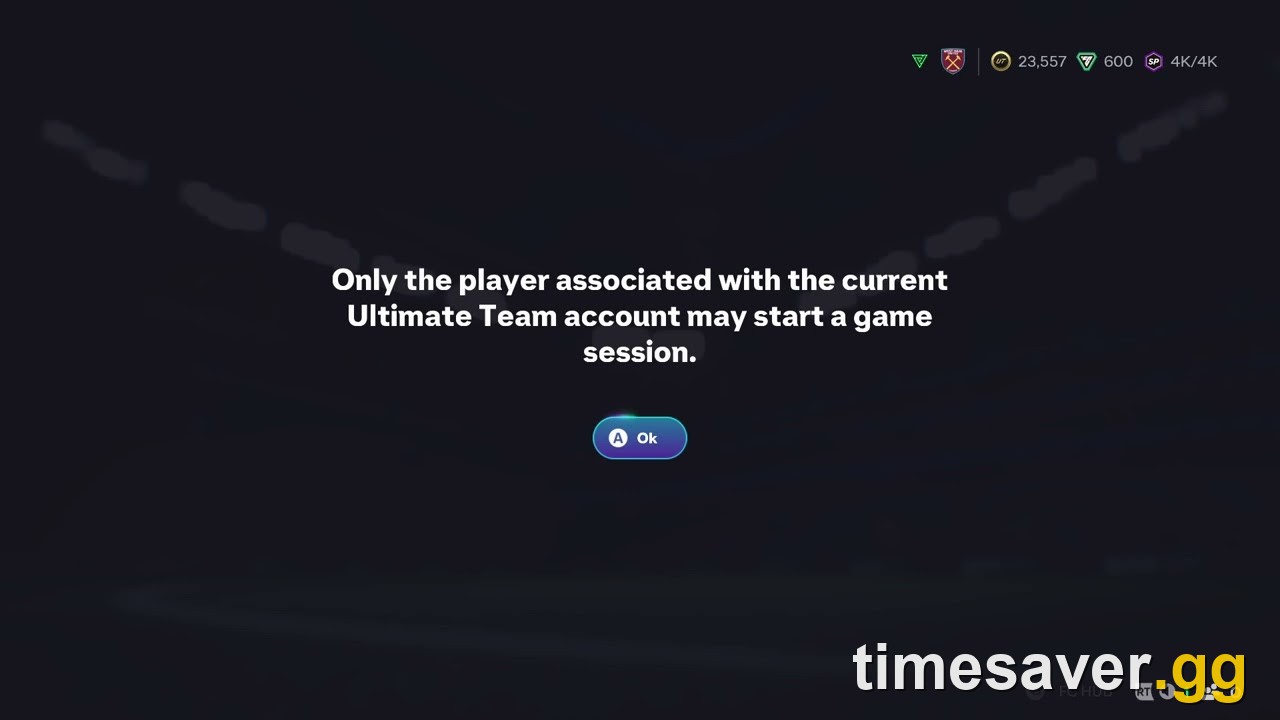
If FC 27 tells you "Only the player associated with the current Ultimate Team account may start a game session," it almost certainly isn't a ban. The game has decided that the input device trying to start the match isn't the one tied to your club. On PC that is almost always the keyboard or mouse winning the first input at boot. On console it is usually a controller that reconnected as a different user profile. EA SPORTS FC 27 has carried the same message, word for word, from previous years, and the fixes players report are the same: get the right device registered as player one, then relaunch.
This guide is written for Season 2 of EA FC 27 (22 October to 3 December 2026), with Title Update 1.1.0 live since 27 October. It covers the five causes players report, which fix to try first for each, and how to stop the error eating a week of Division Rivals.
TLDR: the FC 27 Ultimate Team account error in 30 seconds. The message appears when a device other than the one bound to your club tries to start a match. PC fix (the one most players report working): close the game completely, launch it again, and press nothing on the keyboard or mouse. Use the controller for every input from the first screen onward. Controller dropped mid-session: a full relaunch, not a return to the main menu. Steam players: switch Steam Input on or off for FC 27 and relaunch. Console: make sure the controller is signed in to your profile, not a guest or second user. Players and EA's forum replies treat it as an input problem, not a ban, and nobody reports losing coins or players to it. Weekly Rivals rewards still land Thursday 06:59 UTC, so fix it before then.
EA Sports FC 27 - Coins
Stock up on Coins
What does "Only the player associated with the current Ultimate Team account" mean?
Ultimate Team ties your club to one signed-in user and one active input. When you press "Play" in Rivals, Champions, Squad Battles or a Draft, the game checks that the device starting the session belongs to that user. If it thinks a different "player" pressed the button, it refuses with this dialog. Restarting the match screen doesn't help because the wrong device is still registered.
The text itself isn't new. Players reported the identical dialog throughout the last cycle, and a 2017 Switch thread quotes the same opening words. On 28 October, an FC 27 player posted on r/EASportsFC that the error had blocked them for a week. They had restarted the game, unplugged the keyboard and reconnected the controller, and still couldn't finish their Rivals games (r/EASportsFC). The only reply named the cause in one line: the very first thing you press when the game opens has to be the controller, not the mouse or keyboard.
EA's own forum team says the same. In an EA Forums staff reply from the FC 26 cycle, which links to EA's controller guide, the advice to a player whose controller stopped working online was: "Make sure to use the controller throughout the entire boot and loading process. Don't switch from the keyboard to the controller."
Which of the 5 causes do you have?
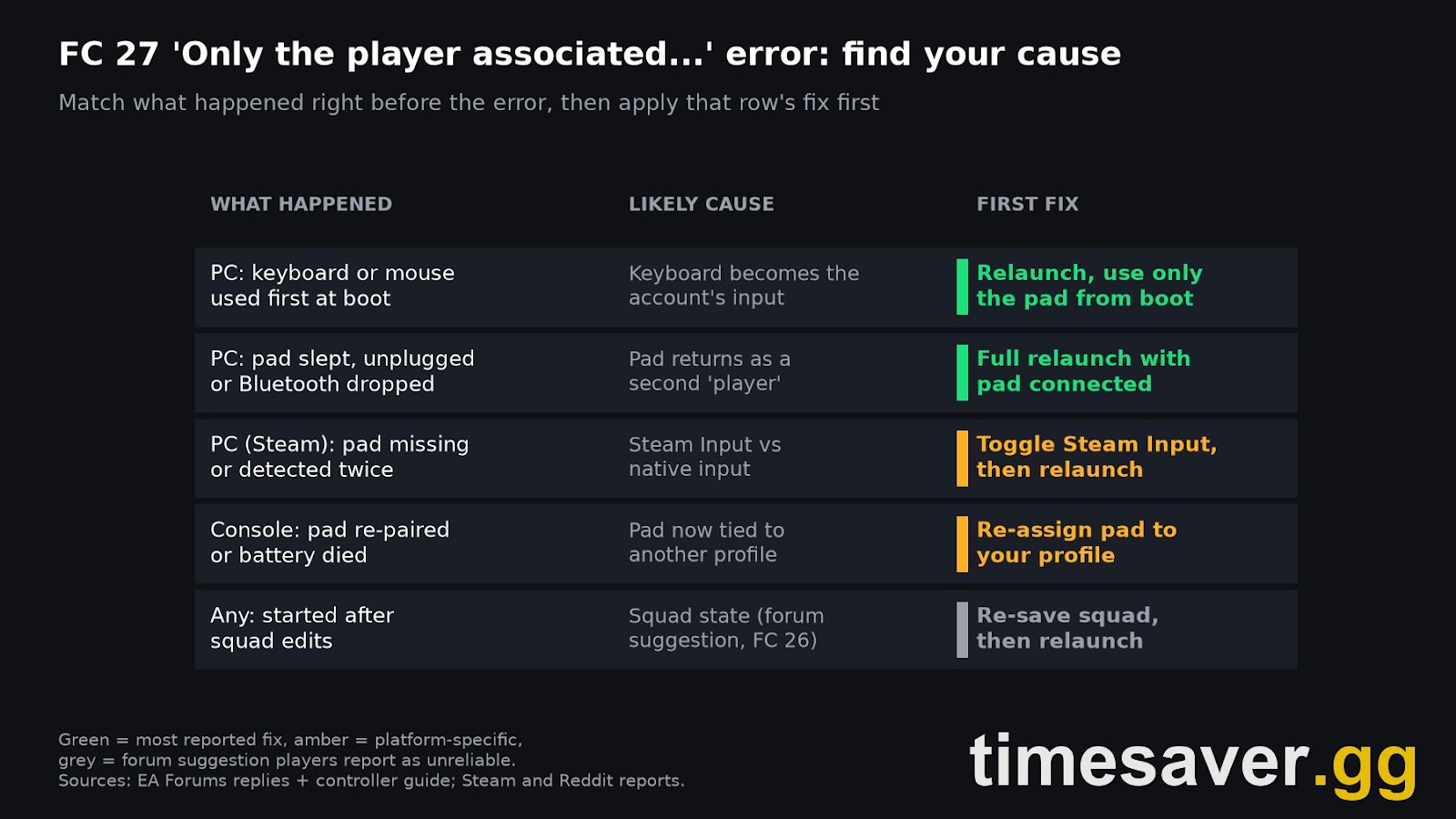
Work out what happened just before the message first appeared. That tells you which fix to try first.
| What happened before the error | Platform | Likely cause | First fix |
|---|---|---|---|
| You pressed Enter, clicked, or touched a key on the start screen | PC | The keyboard became the account's input | Fix 1: clean relaunch, pad only |
| Controller went to sleep, battery died, cable slipped, or Bluetooth dropped | PC | The pad came back as a second "player" | Fix 2: full relaunch with pad connected |
| Controller undetected, detected twice, or buttons scrambled | PC (Steam) | Steam Input conflicting with the game's native input | Fix 3: toggle Steam Input |
| Controller re-paired, switched off, or another user signed in | PS5, Xbox Series X and S | The pad is signed in as a different profile | Fix 4: re-assign the pad |
| Error only started after building or editing a squad | Any | Squad session state | Fix 5: re-save squad, then relaunch |
Most reports are the first two rows. Both are PC problems, and both fit the same pattern players describe: FC 27 appears to tie your Ultimate Team session to whichever input device it registers first, and not to re-check that after you switch. EA hasn't documented the mechanism.
How do you fix it on PC? (Fixes 1 and 2)
Fix 1: the clean relaunch. This is the fix players report most often, and it's the one EA's forum advice points to.
- Close FC 27 completely. On the EA app or Steam, make sure the process has exited. Returning to the main menu is not enough.
- Make sure your controller is connected before you launch. If it's wireless, wake it first.
- Launch the game and don't touch the keyboard or mouse. Skip intro videos, press "start" and get through the sign-in screens with the controller only.
- Go into Ultimate Team with the controller and start a Squad Battles or Rivals match.
If you need the mouse to click through an EA app or anti-cheat window before the game opens, that's fine. The rule applies from the moment the FC 27 window has focus.
Fix 2: when the pad dropped mid-session. If the error appeared after your controller went idle, its battery ran out, the cable slipped or Bluetooth dropped, a menu-level reconnect won't fix it. The game now treats the reconnected pad as a new device and the session has fallen back to the keyboard. In an FC 27 EA Forums thread about PS4 pads sending random inputs over Bluetooth, one player replied that they also couldn't play Rivals because of this exact message. Do the full relaunch from Fix 1. To stop it happening again:
- Use a cable for competitive sessions. A wired pad won't drop out because of a flat battery or a Bluetooth hiccup between Rivals games.
- Turn off controller auto-sleep in your Bluetooth or controller software, or charge it before a long session.
- Unplug extra input devices like a second pad, a racing wheel or a drawing tablet. Each one is another candidate for "player one".
Does Steam Input cause it? (Fix 3)
It can. On Steam, the controller passes through Steam Input before FC 27 sees it. Depending on your pad, that can make the game miss the controller entirely or see it twice, and either way the keyboard ends up as the main input. EA's controller troubleshooting guide tells Steam players to go to Steam → Library → right-click your FC title → Properties → Controller and test both Enable Steam Input and Disable Steam Input.
There's no single right setting. Players generally report that Xbox pads work with Steam Input off, because the game supports them natively, while PlayStation and third-party pads more often need it on. Change one setting, relaunch fully, then test with a Squad Battles match before you queue Rivals. The same guide also suggests turning off overlays while testing (EA app, Steam, Xbox Game Bar, Discord) and trying a different USB data cable or port.

Did Title Update 1.1.0 fix it?
Not by name. Title Update 1.1.0 went live on 27 October with 13 fixes tagged [PC Only]. By our count, 6 of the 13 are about input devices: mouse clicks not working on some Ultimate Team menus, key bindings that couldn't be changed in Keyboard Only mode, mouse issues in Goalkeeper and Gallery navigation, and an inactivity kick when using the mouse in The Grounds menu. One line is directly about controllers. EA's notes read: "[PC Only] Some controllers were being detected correctly." That reads like a typo with a missing "not". In context, our reading is that some controllers were not being detected correctly and that this is now fixed, but EA hasn't corrected or clarified the line.
That line is relevant, because a pad the game fails to detect leaves the keyboard as your input. But none of the 13 fixes mentions the Ultimate Team account dialog, and r/EASportsFC reports of it continued on 28 October, the day after the update. Treat 1.1.0 as "may help some pads", not "fixed". EA's next patch, Title Update 1.2.0, is due mid-November. Our Title Update 1.1.0 breakdown has the full list of changes.
EA Sports FC 27 - FUT Champions Boost
Get fut champions boost in 10 minutes
How do you fix it on PS5 or Xbox? (Fix 4)
On console there's no keyboard to blame. The usual cause is a controller that's now signed in as someone else. A pad that switched off, ran out of battery or got re-paired can come back assigned to a different profile, often a second user or a guest, and FC 27 then sees that "player" trying to start a match on your club.
- PS5: when a controller turns back on in a multi-user household, the console asks who is using it. Pick your own profile. If you're not sure, press the PS button, check which user is active on that controller, and switch if needed.
- Xbox Series X and S: press the Xbox button, open Profile & system, and check which profile the controller is signed in to. Switch it to the account that owns the club.
- Then fully close the game, not just exit to the dashboard, and relaunch it with only your controller on.
If more than one controller is switched on, turn off the extras. Two pads on two profiles is the easiest way to make the game check the wrong one.
What if none of that works? (Fix 5 and the last resorts)
An FC 26 Steam Community thread from the last cycle includes a reply suggesting the game may be tracking a stale squad state, and that changing or re-saving your active squad can help. The same reply admitted the suggestion wasn't reliable, and another player in that thread said it didn't work for them. It costs nothing, so try it after Fixes 1 to 4:
- Open Squads, make one change to your active squad, and save it. Or set a different squad as active, then switch back.
- Fully close and relaunch the game with the controller only.
If you've done everything and the dialog still appears in every mode:
- Try another mode first. If Squad Battles starts but Rivals doesn't, the problem is the session, not the account. Relaunch again.
- Check your connection. If the error comes with server drops, see our lost connection to EA servers fix and the can't connect to EA servers guide.
- Repair the game files in the EA app or Steam. If FC 27 is also crashing on startup, our PC launch and crash fix covers that.
- Contact EA Help with your platform, controller model and when the error first appeared. Since it isn't a ban, EA can't "unlock" anything from their side, but logging it adds to the case for a patch.
Will this error cost you Rivals or Champions rewards?
It can, and that's the real damage. The error doesn't take coins, players or progress, but every day it blocks you is a day you can't play.
- Division Rivals is weekly. Weekly rewards release Thursdays at 06:59 UTC, according to EA Help's Rivals article. A blocked weekend can cost you a reward tier, and the week doesn't extend for you. Our FC 27 reset times guide converts that time for every region.
- Champions qualification runs on CQP. In FC 27 you earn Champions Qualification Points through Rivals or Squad Battles (EA Help, Champions), so a blocked week is also a week of no CQP.
- Season 2 runs to 3 December 2026, and your Rivals division resets with the Season. Losing a week near the end of Season 2 matters more than losing one now. See where the Season reset drops you.
- Don't count on compensation. EA hasn't announced any for games players couldn't start because of this error, so fix it before your next Rivals session.
Lost a week of Rivals to this error and still need your wins before Thursday? Our FC 27 team can play your Rivals and Champions matches for you, or top up your club with coins so you can still build for Season 2.
- EA FC 27 FUT Champions Boost: Rivals wins and Champions played by pro players
- EA FC 27 Coins: Comfort Trade, paced delivery
- EA FC 27 Evolutions Boost: Pathways cleared for you
- All EA FC 27 services
How do you stop it coming back?
These habits stop most repeat cases:
- Controller first, always. Make it a habit: the first input after FC 27 opens comes from the pad. This one habit prevents most of the PC cases.
- Wired for Rivals and Champions. No battery or Bluetooth drop to trigger it.
- One pad, one profile. Switch off spare controllers and keep the console pad signed in to the club owner.
- Don't click back into the game. On PC, clicking into the FC 27 window and then pressing keys can hand input to the keyboard again. Alt-tab back and carry on with the pad.
- Relaunch after any disconnect. If your pad drops mid-session, close and relaunch before your next competitive match, not after it fails.
FAQ
Is "Only the player associated with the current Ultimate Team account may start a game session" a ban? Almost certainly not. Player reports and EA's forum replies treat it as an input and session check, and the fixes above clear it without any account action from EA. It stops the current input device from starting a match.
Why does FC 27 think the keyboard is a different player? On PC, players report that the game treats your first input as the active player. If that's a key press or mouse click, the keyboard becomes the device tied to your Ultimate Team session, and the controller is treated as a second player who isn't allowed to start the match.
Do I lose my Rivals progress or coins? Nobody reports losing coins, players or Division Rivals progress to this error. The real loss is the time you can't play, which matters because Rivals rewards are weekly and release on Thursday at 06:59 UTC, and you also can't earn CQP for Champions.
Does unplugging the keyboard fix it? Sometimes, but not on its own. If the game already registered the keyboard, unplugging it mid-session usually leaves the same error. Unplug or ignore the keyboard, then fully relaunch and use the controller from the first screen.
Did EA fix this in Title Update 1.1.0? Not by name. Update 1.1.0 (27 October) fixed some PC controllers not being detected correctly, which may help some pads, but none of its 13 PC-only fixes mention this dialog. Players were still reporting it the day after the update. Title Update 1.2.0 is due mid-November.
Can it happen on PS5 or Xbox? Yes, but less often. On console it's usually a controller that reconnected as a different user profile. Re-assign the pad to the profile that owns your club and relaunch the game.