Quick answer: Yes, WoW Forever supports controllers at launch, in what Blizzard calls a functional beta. It works with any XInput-compatible controller and shows Xbox or PlayStation button icons. Turn it on with Esc → Options → Gameplay → Gamepad. You get 4 action bars per set (default, hold LT, hold RT, hold LT+RT), 3 switchable sets and 84 ability slots in total. LB targets friends and RB targets enemies. LB+RB plus a face button or D-pad direction opens your bags, quest tracker, chat and buffs. Keep a keyboard nearby: typing in chat still needs one.
Last verified: Nov 4, 2026, 00:45 UTC. Sources: Blizzard's Explore WoW: Forever with a Gamepad (published Nov 3, 2026) and community manager Kaivax's WoW Forever Development Notes (gamepad sections dated Sep 24, Oct 1, Oct 8, Oct 15 and Nov 2).
Update log
- Updated Nov 4, 00:45 UTC: corrected the Edit Mode note (layouts are saved per UI type since October 8) and added the LB+RB+A Focus Target shortcut.
- Updated Nov 4, 00:20 UTC: first version, written from Blizzard's Nov 3 gamepad guide and the November 2 development notes, about 23 hours before the 15:00 PST (23:00 UTC) launch.
The servers open on November 4 at 3:00 p.m. PST. If you plan to play from the couch, it's worth setting this up before launch, because some of the first screens you'll see (ruleset selection, the character list, skipping the intro cinematic) only got gamepad support in the last build before launch. Times for every region are in our WoW Forever launch time guide.
This full loadout costs $326.46 on Timesaver and is delivered within 12 days — see all WoW Forever prices.
Skip the grind in WoW Forever
| Item | Price | Delivery | Buy |
|---|---|---|---|
| Gold | $20.95 | 30 minutes | Buy now |
| Power Leveling | $208.99 | 12 days | Buy now |
| PvP Rank & Honor | $96.52 | 7 days | Buy now |
WoW Forever prices today
- Gold: from $20.95 USD, within 30 minutes, No account access, US, EU
- Power Leveling: from $208.99 USD, within 4.5 days, Piloted / Self-play Remote, US, EU
- PvP Rank & Honor: from $96.52 USD, within 14 days, Piloted / Self-play Remote, US, EU

WoW Forever - Gold
Get Gold
Does WoW Forever support controllers?
Yes. Blizzard's November 3 guide says WoW Forever "supports all XInput-compatible controllers and includes Xbox and PlayStation button icons to help you recognize the controls." In practice that covers the Xbox controllers and most third-party PC pads that use the same standard. Blizzard doesn't publish a list of tested PlayStation models, only the icon set.
Blizzard's status label is careful. The guide closes with:
"Controller support is available in WoW: Forever in a beta state for players who prefer a gamepad. Further refinements are planned as work on the experience continues." (Blizzard, Explore WoW: Forever with a Gamepad, Nov 3, 2026)
The November 2 development notes give the scope: "all major gameplay and core user interface experiences can be played with a controller, including movement, spells, interactions, UI navigation, etc." So you can quest, run dungeons and handle menus on a pad. What still needs a keyboard is typing. Blizzard says a "keyboard-free experience" is the longer-term aim, not a launch feature.
The game itself runs on Windows and Mac. Blizzard doesn't list any console or handheld version. Hardware minimums are in our WoW Forever system requirements post.
How do you turn on gamepad mode in WoW Forever?
Blizzard's steps:
- Press Escape to open the Game Menu.
- Select Options.
- Under Gameplay, choose Gamepad. This switches the game from keyboard-and-mouse input to the gamepad UI.
The Gamepad settings page then lets you tune six areas: Camera, HUD Modifier, Frame Focus Style, Action Bars, Targeting and Raid Targeting Options. The action bar layout itself, including the compact bar that only shows your active bar, lives in Edit Mode. Blizzard moved those settings out of the Options menu on October 8.
Keyboard and gamepad layouts are separate. Since the October 8 notes, "Edit Mode layouts are now saved and loaded per ui type", so your gamepad layout and your keyboard-and-mouse layout don't overwrite each other. (In the October 1 build, switching modes reset the layout; the October 8 change replaced that.) The same notes say the old gamepad action bar options were not carried over when they moved into Edit Mode, so if you set them up early in the beta, open Edit Mode, click the gamepad action bar and set them again.
On controllers with supported lighting, Blizzard says the light turns red for a Horde character and blue for an Alliance character.

What does each button do on a WoW Forever controller?
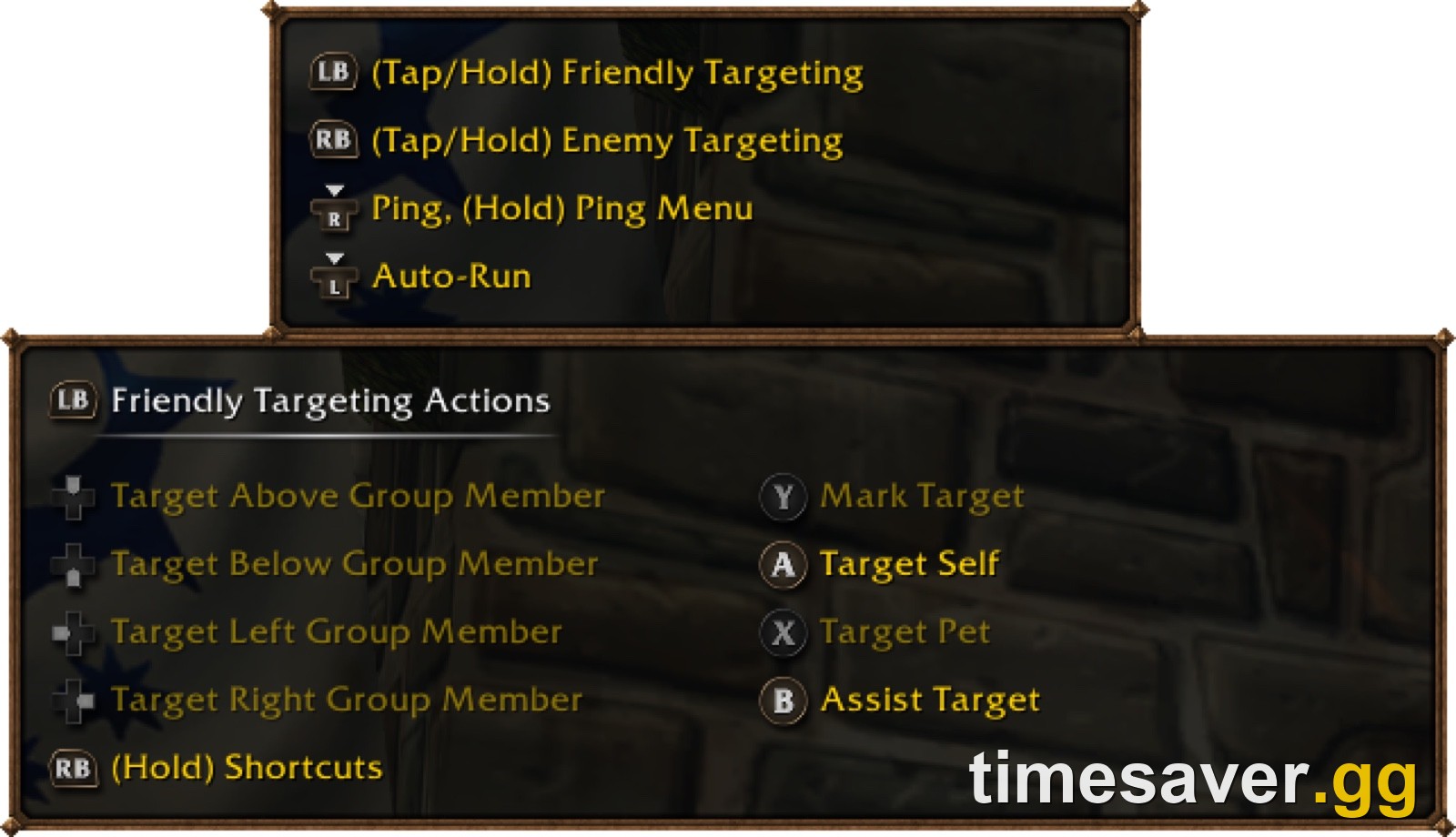
Blizzard describes the controls using Xbox button names (the game also ships PlayStation icons). Here is the default map from the November 3 guide, plus the targeting legend shown in Blizzard's own screenshot:
| Input (Xbox name) | What it does |
|---|---|
| Left stick | Move |
| Right stick | Camera |
| LB | Friendly targeting (tap or hold) |
| RB | Enemy targeting (tap or hold) |
| X | Interact |
| A | Jump |
| B | Back |
| Y | Inspect |
| Hold LT, RT or LT+RT | Switch to action bar 2, 3 or 4; release to return to the default bar |
| LB + RB + right stick forward/back | Zoom the camera in or out |
| LB + RB + D-pad left/right | Switch between the 3 action bar sets |
| Menu button | Main Menu |
| View button | Change Focus Frame |
| Click right stick | Ping; hold for the ping menu (in-game legend) |
| Click left stick | Auto-run (in-game legend) |
The face buttons "also have spell functions," as Blizzard puts it, so X, A, B and Y share duty between their menu job and the abilities you put on them.
Friendly targeting is built for healers. Blizzard's legend screenshot shows that while you hold LB, the D-pad targets the group member above, below, left or right of you on the party frames, A targets yourself, X targets your pet, B assists your target and Y marks it. The October 1 notes made the compact party and raid frames work with a gamepad, and the November 2 notes added targeting for a saved Focus Target and for friendly corpses, so resurrections work from the pad too.
How do action bars work on a WoW Forever gamepad?
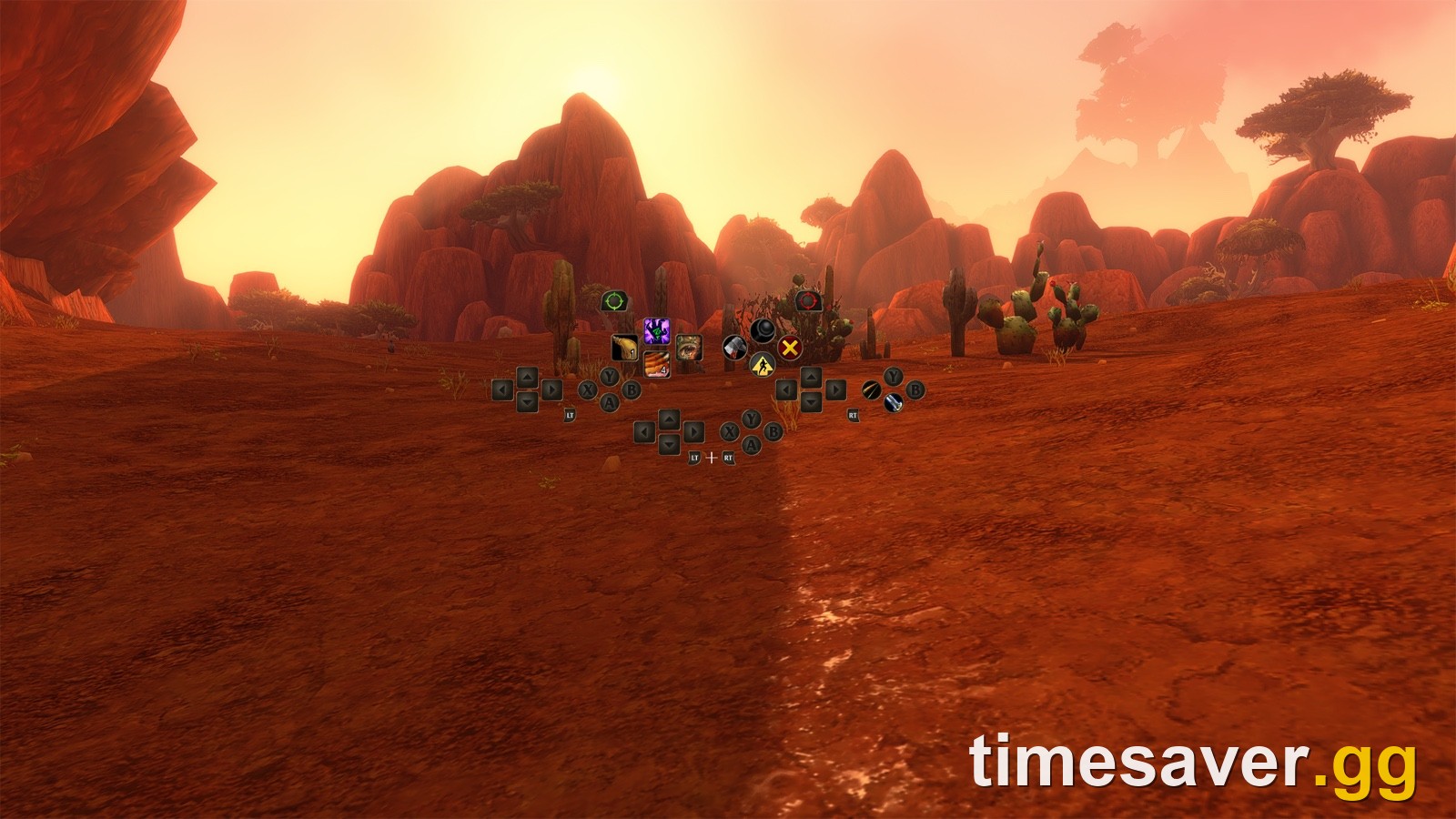
This is the part that decides whether a class feels good on a controller. The numbers, from Blizzard:
- 4 action bars on screen, all using the same button layout: the default bar, hold LT, hold RT, and hold LT+RT.
- 28 slots across those 4 bars, which make up one set.
- 3 sets, switched with LB+RB and D-pad left or right.
- 84 customizable slots in total (3 × 28).
Blizzard's example is a Mage who puts four spells on the same D-pad direction: Up = Polymorph, LT+Up = Fireball, RT+Up = Frostbolt, LT+RT+Up = Blizzard. Blizzard says these are "example assignments, not fixed bindings." You choose which spell goes in each slot.
Don't confuse that with rebinding the buttons. The October 1 notes say "the gamepad UI bindings are now static, and any gamepad rebinding only affects the keyboard and mouse interface." You can't move Jump off A, for example. At least one beta tester on r/classicwow singled out rebinding the face buttons as the change they most wanted. You decide what sits in each slot, but each button's built-in job stays fixed.
A practical way to use the 3 sets: keep set 1 for your combat rotation, set 2 for utility, buffs and consumables, and set 3 for professions, mounts and travel. Classes with forms, stances or pets got extra care in the beta. The September 24 notes stopped the pet bar from replacing the bottom gamepad bar for Hunters and Warlocks, and the November 2 notes added the Pet Move command and ground-targeted AoE items on the gamepad bar. To plan which spells you'll actually have at each level before you fill the bars, use the WoW Forever talent calculator.
What are the LB + RB shortcuts?
Hold both shoulder buttons, then press:
| Shortcut | Opens |
|---|---|
| LB + RB + B | Backpack |
| LB + RB + D-pad Up | Quest Tracker |
| LB + RB + D-pad Down | Chat |
| LB + RB + Y | Manage Buffs |
| LB + RB + A | Select your Focus Target (November 2 notes) |
The same features are also in the main radial menu. A gamepad legend in the top-left corner of the screen expands to show more options as you act, and most panels have a footer listing their button prompts. Blizzard's own caveat: "Not every screen has a footer yet."

What changed for gamepads during the beta?
The controller mode in the launch build is very different from the one beta testers had in September. Here is every gamepad section in Kaivax's development notes (the class and system changes are in our WoW Forever launch patch notes):
| Notes dated | Gamepad changes (Blizzard wording, shortened) |
|---|---|
| Sep 24 | Settings still labelled "Gamepad (Alpha)". New Compact Action Bar. Pet bar no longer replaces the bottom gamepad bar for Hunters and Warlocks. Edit Mode layouts now apply in gamepad UI |
| Oct 1 | Gamepad bindings made static. Pet stable and compact raid/party frames made gamepad-usable. Macros on the gamepad bar can be moved. Switching UI mode reset the Edit Mode layout (replaced Oct 8) |
| Oct 8 | Edit Mode layouts saved per UI type. Gamepad Action Bar moved into Edit Mode; old options have to be set again there |
| Oct 15 | Press and Hold Casting works on gamepad. Trade, Guild and Communities, Chat Channels and Transmog windows made gamepad-usable. Quests from objects can be turned in |
| Nov 2 | "Functional Beta state." Ruleset selection, cinematic skip, Focus Target, friendly corpses, ending a flight path early, Pet Move, AoE ground items, bag fixes, fewer addon conflicts |
The November 2 entry alone lists more than 30 gamepad fixes. The ones you'll notice in your first hour: you can now pick a ruleset and skip the intro cinematic without touching the mouse, newly created characters are auto-selected on the character screen, and pop-ups that you didn't open no longer steal gamepad focus.
What changed on Nov 3: Blizzard's guide repeats the "beta state" label. Some early copies of the November 2 notes quoted it as "complete functional state." The live forum post reads "Gamepad Support has entered a functional Beta state," and that is the wording this guide uses.
WoW Forever - Power Leveling
Get Power Leveling
Do addons work with controller mode?
Mostly, with one Blizzard-confirmed improvement. The November 2 notes say Blizzard "Improved Gamepad UI compatibility with user-created add-ons to reduce the likelihood of add-on conflicts causing interface issues." That is a fix for conflicts, not a promise that every addon works. If an addon redraws your action bars or bags, it's the first thing to disable when the gamepad UI behaves oddly.
Blizzard hasn't said anything about third-party controller addons such as ConsolePort, which many Classic players used before Forever had native support. One longtime ConsolePort user on r/classicwow wrote during the beta that the built-in mode was good but "still a long way from being console port quality," and added that it was early and bare-bones. On r/wow, another beta player said they found it hard to go back to the keyboard after playing Forever on a pad. Our WoW Forever addons list tracks which addons load at launch.
Which classes are easiest to play on a controller?
Blizzard hasn't ranked classes for gamepad play, so take this as reasoning from the button count, not data. With 28 slots per set, the classes that fit on one set without juggling are those with short rotations and few situational buttons: Warrior, Rogue and Hunter during leveling. Healers benefit most from the LB plus D-pad party targeting. Druids and Shamans carry the most situational spells and will use all 3 sets sooner. One beta tester on r/wow put it simply: it felt awkward at first, some classes will be easier than others, and you get used to it quickly.
If you're still picking a main, our best class for solo beginners guide covers the leveling side, and the Classic vs Enhanced preset guide covers the interface preset you choose before the first screen loads.
How should you set up a controller before launch?
A 10-minute checklist for the hours before 3:00 p.m. PST:
- Connect and test the pad on your PC or Mac before launching the game, so Windows or macOS sees it as a controller.
- Switch to gamepad mode (Esc → Options → Gameplay → Gamepad), then build your gamepad layout in Edit Mode. It's saved separately from your keyboard layout.
- Turn on the Compact Action Bar in Edit Mode if the four-cluster HUD feels crowded. It shows only the bar you're using.
- Plan set 1 as your rotation and leave sets 2 and 3 for utility and travel.
- Check the Press and Hold Casting setting if you like holding a button to repeat a cast. It works with gamepad since the October 15 notes.
- Keep a keyboard in reach for chat, guild invites and the name screen.
- Bookmark our live WoW Forever server status for the launch-night queues and maintenance.
The rest of the launch prep, including the pre-install, the ruleset choice and the invite codes, is in our WoW Forever launch day checklist.
Can you play WoW Forever on a controller without a keyboard at all?
Not fully, yet. Movement, combat, looting, bags, the map, trade, transmog, professions and menus all work on the pad, according to Blizzard's notes. Typing does not. Chat, whispers and naming need a keyboard. Blizzard calls "a keyboard-free experience" its longer-term aim, with no date attached.
If you'd rather spend launch week playing than learning a new layout, timesaver.gg offers WoW Forever power leveling and WoW Forever gold for mount and training costs.
FAQ
Can I buy this loadout instead of farming it? Yes: this loadout costs $326.46 on Timesaver, and a Timesaver pro completes it by hand within 12 days. How handover works and what happens if something goes wrong: account safety.
Does WoW Forever have controller support? Yes. It launches with native gamepad support in what Blizzard calls a functional beta state. Blizzard says it supports all XInput-compatible controllers and shows Xbox and PlayStation button icons.
How do I enable the controller in WoW Forever? Press Escape, open Options, and choose Gamepad under Gameplay. Action bar options such as the Compact Action Bar are in Edit Mode.
Can I rebind controller buttons in WoW Forever? Not the gamepad UI's core buttons. Since the October 1 beta notes, those bindings are static, and gamepad rebinding only affects the keyboard-and-mouse interface. You still choose which spell goes on each of the 84 action slots.
How many abilities fit on a WoW Forever controller? 84. Each set has 4 bars (default, LT, RT, LT+RT) with 28 slots combined, and you can switch between 3 sets with LB+RB and D-pad left or right.
Do I still need a keyboard to play WoW Forever on a controller? Yes, for typing. Chat needs a keyboard, and Blizzard describes a keyboard-free experience as a longer-term goal.
Does WoW Forever work on Steam Deck or consoles? Blizzard lists Windows and Mac only. There is no console version, and Blizzard doesn't list the Steam Deck as a supported device.
Get a head start on WoW Forever
Want to skip the slow parts of launch week? timesaver.gg covers the two things fresh-start players ask for most: gold for the first mount and training costs, and leveling done by hand on the quest route.
- WoW Forever Gold — US & EU realms — bank your fresh-realm startup capital, face-to-face or by mail
- WoW Forever Power Leveling to 60 — any range from 1 to 60, played by hand on the quest route
- All WoW Forever boosting services