Quick answer (TLDR): Memory Error 968053563-0 is a Call of Duty error that started spiking in mid-August 2026 and hits Black Ops 7, Warzone and Black Ops 6 together — it usually boots you at the splash/loading screen before you can get into a match. On console the fix that's actually working for most players is to boot into Safe Mode and Rebuild the Database (PS5) or power-cycle (Xbox), then drop your Texture Quality/cache to the lowest setting. On PC, run Scan and Repair, update your GPU driver, and lower texture/VRAM settings. Refreshing licenses and reinstalling alone usually don't fix it — the database rebuild is the one that lands. Work the checklist below top to bottom. See our full HUENEME-NEGEV networking fix for more details. (see our enrollaik.exe error fix guide). For a full guide, see COD HQ not loading fix.
If you booted up Call of Duty this week and got kicked to your dashboard with Memory Error 968053563-0, you're not alone and it's almost certainly not your hardware failing. The error started appearing across the r/CODWarzone and r/blackops6 subreddits in mid-August 2026, and the common thread is that it hits more than one Call of Duty title on the same account — players report the exact same code on Black Ops 7, Warzone and Black Ops 6, which points at the shared launcher/asset layer rather than a single game.
The good news: memory errors in Call of Duty have a well-worn fix list, and the specific one players are landing on for 968053563-0 is a console database rebuild. This guide gives you the exact order to try things on PS5, Xbox and PC, fact-checked against Activision's own troubleshooting guidance and the fixes players are confirming right now.

Call of Duty - Bot Lobby
Get bot lobby in 10 minutes
What is Memory Error 968053563-0 in Call of Duty?
A "Memory Error" in Call of Duty is the game telling you it couldn't correctly load an asset into memory — the texture, shader or data package it needs isn't where it expects it, or the copy it loaded is corrupted. Historically these show up as short codes like 0-1766 or 13-71; the long 968053563-0 string is the same class of problem, just a newer identifier.
Three things make this particular wave stand out:
- It's cross-title. The same account throws the error on Black Ops 7, Warzone and Black Ops 6. One player summed it up bluntly: "Memory Error 968053563-0. Haven't got a clue, re-downloaded and still same error. Same error on BO6." That cross-game behaviour points at the shared Call of Duty launcher/asset cache, not one broken install.
- It kicks you early. Most reports are at the splash screen or during the initial load, before you reach a lobby — so you can't even change an in-game setting to fix it.
- Reinstalling doesn't reliably clear it. Several players redownloaded the entire game and still hit the error, which is the biggest clue that the problem is in the console database / cache layer, not the game files themselves.
That last point is why the fix order below leads with a database rebuild rather than a reinstall.
How do you fix Memory Error 968053563-0 on PS5?
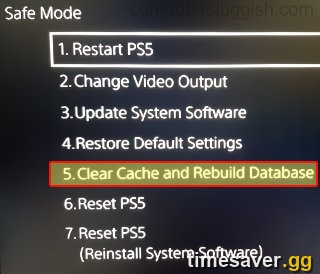
This is where most confirmed fixes are coming from. Work these in order and test after each one:
- Rebuild the PS5 database (the fix that's working). Fully power off the PS5. Hold the power button until you hear the second beep to enter Safe Mode, connect your controller with a USB cable, and choose Clear Cache and Rebuild Database → Rebuild Database. This reorganises the drive and clears the corrupted cache entry that's throwing the error. Multiple players confirm this is what cleared 968053563-0 — as one r/CODWarzone player put it: "I managed to fix it by rebuilding the database... so weird lol. Refreshing the licenses didn't do anything, DB rebuild did it."
- Drop your texture cache/quality to the lowest setting. Once the game finally loads, immediately lower Texture Quality (and any texture streaming/cache setting) to the minimum. The same player noted they set "texture cache to the lowest setting from medium" right after the rebuild to keep it from recurring. High texture streaming is the most memory-hungry setting and the most likely to trip the error again.
- Restore Licenses (do this too, even though it's not the main fix). Go to Settings → Users and Accounts → Other → Restore Licenses. On its own it rarely fixes 968053563-0, but it's quick and rules out a licensing hiccup.
- Rebuild first, reinstall last. Only if the database rebuild fails should you delete and reinstall the game. Because players have redownloaded and still seen the error, a reinstall is the heavy-handed last resort, not the first thing to try.
How do you fix it on Xbox?
Xbox players are hitting it too. You can't rebuild a database like on PS5, so the equivalent is a full cache clear:
- Hard power-cycle the console. Hold the Xbox power button for ~10 seconds until it fully shuts down, unplug the power cable for 30 seconds, then plug back in and restart. This clears the temporary cache that a half-applied update can corrupt.
- Clear the persistent local storage / MAC address cache. In Settings → General → Network settings → Advanced settings, you can clear the alternate MAC address, then restart — this forces a clean network/cache state.
- Unlink and relink the console from your Activision account. A long-standing fix for Call of Duty memory errors (it originally surfaced for the 13-71 code) is to log into your Activision account online, unlink the console, then reopen the game and log back in when prompted. It clears a stale account-device association that can block asset loading.
- Reinstall only if the above fails. Same rule as PS5 — reinstalling is last, because it doesn't reliably clear this code.
How do you fix Memory Error 968053563-0 on PC?

On PC the error is more likely to be corrupted files or a graphics-memory ceiling. Run these in order:
- Scan and Repair your game files. In Battle.net, select Call of Duty, click Options (the gear next to Play) → Scan and Repair. On Steam, right-click Call of Duty → Properties → Installed Files → Verify integrity of game files. This replaces the corrupted asset that's triggering the memory error and is the single highest-value PC fix.
- Lower Texture Quality and VRAM usage. In the in-game Graphics menu, reduce Texture Resolution and any Texture Streaming setting, and keep your estimated VRAM usage under ~75% of your card's memory so there's headroom for spikes. Overshooting VRAM is a classic cause of memory errors on PC.
- Update (or clean-reinstall) your GPU driver. Install the latest NVIDIA/AMD driver. If it persists, use Display Driver Uninstaller (DDU) in Safe Mode to fully wipe the old driver, then install a known-good version cleanly.
- Clear the shader cache and let shaders recompile. After a patch, a corrupted shader cache can throw memory errors — clear it in the game's graphics settings and let it rebuild on the main menu.
- Check your page file / virtual memory. If you're low on system RAM, set Windows virtual memory to System managed (or a fixed size at least 1.5× your RAM) so the game has swap headroom.

Call of Duty - Ranked Boost
Get ranked boost in 10 minutes
Is Memory Error 968053563-0 server-side — do you just have to wait?
Sometimes, yes. A subset of players report that nothing on their end fixed it — one noted: "Refreshing licenses, rebuilding the database, even safe-mode reboot and redownloading the game didn't help." When a memory error hits a large number of accounts at once right after an update and survives every local fix, part of the cause can be server- or account-side, which only Activision can resolve.
If you've genuinely run the full checklist and it's still throwing the error:
- Check the Call of Duty server status at the Activision Online Services page before assuming it's you.
- Wait for a hotfix. Post-update memory-error waves are often quietly resolved server-side within a day or two.
- Submit a ticket at support.activision.com with the exact code so it's logged against the wave — the more reports tied to 968053563-0, the faster it gets prioritised.
The fast fix checklist
Run this top to bottom and stop when the game loads:
| # | Fix | Platform | Why |
|---|---|---|---|
| 1 | Rebuild Database in Safe Mode | PS5 | Clears the corrupted cache entry — the confirmed fix |
| 2 | Lower Texture Quality/cache to minimum | PS5 / Xbox / PC | Cuts the memory load that re-triggers it |
| 3 | Hard power-cycle (hold 10s, unplug 30s) | Xbox | Clears corrupted temp cache |
| 4 | Restore/Refresh Licenses | PS5 | Rules out a licensing hiccup |
| 5 | Unlink & relink console from Activision account | Xbox / PS5 | Clears stale device association |
| 6 | Scan and Repair / Verify game files | PC | Replaces the corrupted asset |
| 7 | Keep VRAM usage under ~75%, update GPU driver | PC | Stops graphics-memory overrun |
| 8 | Clear shader cache, check page file | PC | Rebuilds corrupted shaders / adds swap headroom |
| 9 | Check server status, submit a ticket, wait | All | If it's a server-side wave |
| 10 | Delete & reinstall (last resort) | All | Only if a rebuild/repair failed |
Rather skip the error-screen roulette and just play?
Post-update error waves like this always land at the worst time — right when you're trying to level a new weapon or grind out a camo before an event ends. If you're losing playtime to error screens and rough post-patch servers, timesaver.gg can keep your progression moving while the dust settles:
Keep your grind on track even when the servers are having a week:
- CoD Account & Weapon Leveling — pro players level your account and guns fast, so a bad-update week doesn't cost you progress.
- CoD Bot Lobbies — easy lobbies to level weapons and finish challenges without fighting sweats and stutter.
- All Call of Duty services — camos, ranked, Zombies and more for Black Ops 7, Warzone and BO6.
For other post-Season 5 issues, see our fixes for Black Ops 7 crashing and FPS drops, lag, stutter and rubberbanding, and the DirectX unrecoverable error.
Frequently Asked Questions
What is Memory Error 968053563-0 in Call of Duty? It's a memory/asset-loading error that started appearing in mid-August 2026 across Black Ops 7, Warzone and Black Ops 6. It usually kicks you at the splash or loading screen before a match. Because it hits multiple titles on the same account, the cause is in the shared launcher/asset cache rather than one broken game install.
What's the fastest fix for 968053563-0? On PS5, boot into Safe Mode and Rebuild the Database, then lower your Texture Quality to the minimum. That's the fix most players are confirming. On PC, run Scan and Repair in Battle.net (or Verify integrity on Steam) and lower your texture/VRAM settings.
Why do I get the same memory error on both Warzone and Black Ops 6? Because Call of Duty shares a launcher and asset layer across titles on the same account. A corrupted cache or database entry affects every Call of Duty game you have installed, which is why the identical code shows up on BO7, Warzone and BO6.
Does reinstalling Call of Duty fix Memory Error 968053563-0? Usually not on its own. Several players redownloaded the entire game and still hit the error, which is exactly why a console database rebuild (PS5) or full cache clear (Xbox) works better than a reinstall. Try the rebuild first and treat reinstalling as a last resort.
Is Memory Error 968053563-0 a server problem I just have to wait out? Sometimes. If you've run every local fix — rebuild, repair, license refresh, reinstall — and it still throws the code, part of the cause can be server- or account-side after a large update. Check the Activision server status, submit a ticket with the exact code, and watch for a hotfix within a day or two.
Will lowering my texture settings really help? Yes, especially as a follow-up after the rebuild. Texture streaming is the most memory-hungry setting in the game, so dropping Texture Quality/cache to the lowest option reduces the load that re-triggers the memory error and keeps the game stable while a proper fix rolls out.