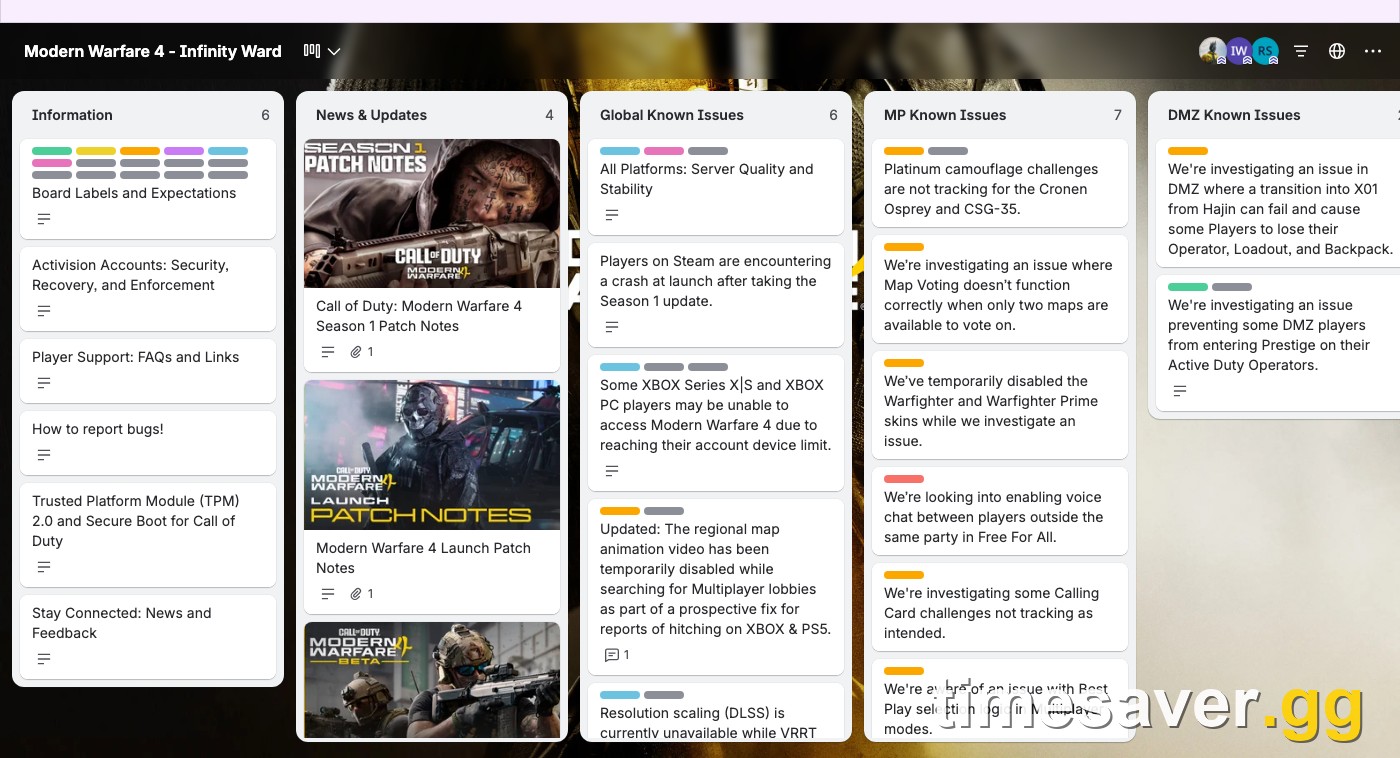
Updated November 7, 2026, about 40 hours after Season 1 went live (00:00 ET on November 6, 9 PM PT on November 5). Every issue below is copied from an official source: Infinity Ward's Modern Warfare 4 Trello board, Activision Support's Known Issues in Modern Warfare 4 page, and the Known Issues section of Raven's Warzone Season 1 patch notes. Anything that comes only from player reports is labeled as such.
This full loadout costs $32.61 on Timesaver and is delivered within 4 hours — see all Call of Duty MW4 prices.
Skip the grind in Call of Duty: Modern Warfare 4
| Item | Price | Delivery | Buy |
|---|---|---|---|
| Bot Lobby MW4 | $12.99 | 4 hours | Buy now |
| MW4 Account Leveling | $16.20 | 4 hours | Buy now |
| MW4 Weapon Leveling | $3.42 | 2 hours | Buy now |
Call of Duty: Modern Warfare 4 - Bot Lobbies
Get bot lobby in 10 minutes
TL;DR: why is MW4 crashing after the Season 1 update?
Quick answer: If MW4 or Warzone crashes at launch on Steam after the Season 1 update, you're hitting an official known issue that Activision is investigating. Fix it in this order: (1) verify the integrity of the game files in Steam, and if that fails, (2) uninstall Modern Warfare 4 and Warzone in Steam, (3) delete the Call of Duty folder inside steamapps\common, (4) reinstall. Infinity Ward calls step 2 to 4 the "final workaround", and it's the only fix they've published. On Xbox Series X|S or the Xbox PC app, a game that won't open or shows no launch button in COD Home is usually the Microsoft 10-device limit. Season 1 also shipped with open bugs that hit progression: Platinum camo challenges not tracking on the Cronen Osprey and CSG-35, a DMZ Operator Prestige blocker, an X01 transition that can wipe your Operator, Loadout and Backpack, and 9 Warzone known issues, including a Double XP Token menu freeze.
The numbers that matter:
- 3 steps in Activision's Steam crash workaround (uninstall, delete the folder, reinstall), after the verify-files first step.
- 10 devices: the Microsoft account limit that blocks some Xbox and Xbox PC players from opening MW4.
- 9 open issues in the Warzone Season 1 patch notes' Known Issues list.
- 2 new Season 1 guns whose Platinum challenges don't track yet: the Cronen Osprey and CSG-35.

Is the MW4 Season 1 Steam crash an official known issue?
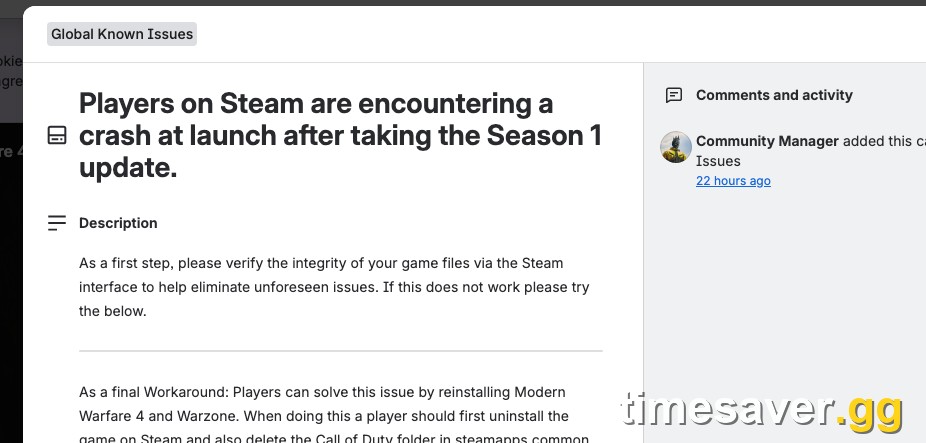
Yes. Infinity Ward added it to the Global Known Issues column of its Trello board on November 6, and Activision Support lists it as "I'm getting game crashes after installing the Season 1 update", platform Steam. The Trello card reads, verbatim:
"Players on Steam are encountering a crash at launch after taking the Season 1 update. As a first step, please verify the integrity of your game files via the Steam interface to help eliminate unforeseen issues. If this does not work please try the below." (Infinity Ward, official MW4 Trello card)
The pattern in player reports matches. On r/CODWarzone, a Steam player wrote on November 7 that the game simply won't start, with no error code, after Season 1. They said they had played Multiplayer and DMZ two days earlier, verified their files and fully reinstalled, and the problem stayed. That last detail matters. A normal uninstall in Steam can leave the old Call of Duty folder behind, which is exactly why Activision's workaround tells you to delete it by hand.
Battle.net players are not on the official card. If you're crashing on Battle.net, use Scan and Repair first, then work through our MW4 launch-day errors and fixes guide, which covers the Battle.net side.
How do you fix MW4 crashing at launch on Steam?
Do these in order. Stop as soon as the game opens.
Step 1: Verify the game files (official first step). In your Steam Library, right-click Call of Duty, then open Properties, then Installed Files, then Verify integrity of game files. Let it finish fully and launch again. This fixes cases where the Season 1 download finished with a damaged or missing file.
Step 2: Uninstall Modern Warfare 4 and Warzone in Steam (official workaround). Remove both from the Steam app. Don't just delete the folder yet.
Step 3: Delete the leftover Call of Duty folder (official workaround). Go to the drive where you installed the game and open the Steam library folder, then steamapps, then common. Delete the Call of Duty folder that's still there. Activision's support page calls it deleting "the steamapps common folder". The Trello card is more precise: delete "the Call of Duty folder in steamapps common folder where Call of Duty was originally installed". Only delete the Call of Duty folder. Your other Steam games live in that same common folder.
Step 4: Reinstall Modern Warfare 4. Reinstall from Steam. Plan for a full download, so check your free space first. Our MW4 file size and storage guide has the per-mode sizes.
Still crashing after a clean reinstall? Then it's likely not the Season 1 file bug. Check the usual MW4 PC suspects, which we've covered in separate guides: Secure Boot and TPM 2.0 (fix guide), the shared COD HQ launcher and its storage location (fix guide), and GPU drivers. Activision also asks PC players to file a PC Crash Report so the team can trace the crash.
NVIDIA note: Infinity Ward's board says players on NVIDIA driver 621.01 "may experience visual issues under some circumstances" and that it's working with NVIDIA on it. That card sits in the Resolved column, but if you see artifacts rather than a crash, a driver change is worth trying.
Why won't MW4 open on Xbox or the Xbox PC app?
Two official issues cover this.
| The 10-device limit. Infinity Ward's Global Known Issues column says "some XBOX Series X | S and XBOX PC players may be unable to access Modern Warfare 4 due to reaching their account device limit." Your Microsoft account allows 10 devices for digital content. Open Microsoft Store device management, remove old consoles or PCs you no longer use, then relaunch. |
|---|
No launch button in COD Home (Xbox on PC). Activision Support lists "I don't have a button to launch the game from COD Home" as an open issue for the Xbox app on PC. Its two tips are the device-limit check above and "try installing Call of Duty: Modern Warfare 4 Content Packs you don't have installed." In practice, check which Modern Warfare 4 content packs are installed for the game in the Xbox app, add any that are missing, then reopen COD Home.
What Season 1 bugs are Infinity Ward and Raven tracking right now?
These are every open Season 1-era issue on the official lists as of November 7. Each row names its source.
| Issue | Mode | Workaround | Source |
|---|---|---|---|
| Crash at launch after the Season 1 update | All (Steam) | Verify files, then uninstall, delete the Call of Duty folder and reinstall | IW Trello + Activision Support |
| Can't access MW4 (account device limit) | All (Xbox / Xbox PC) | Remove old devices, 10 max | IW Trello |
| No launch button in COD Home | All (Xbox PC) | Device check, install missing content packs | Activision Support |
| Platinum camo challenges not tracking for the Cronen Osprey and CSG-35 | Multiplayer | None yet | IW Trello |
| Map Voting broken when only two maps are offered | Multiplayer | None yet | IW Trello |
| Warfighter and Warfighter Prime skins disabled | All | Temporarily disabled | IW Trello + Activision Support |
| Battle Pass Tier Skip Token total doesn't update | All | Back out of the Battle Pass and return | Activision Support |
| BlackCell Clan tag looks wrong when equipped | All | None yet | Activision Support |
| Some players can't enter Prestige on Active Duty Operators | DMZ | Use rare (blue) weapons with only 3 attachment slots | IW Trello |
| Transition from Hajin into X01 can fail and lose your Operator, Loadout and Backpack | DMZ | None yet | IW Trello |
| Activating a Double XP Token can freeze the menu | Warzone | Exit and re-enter the menu | Warzone S1 patch notes |
| Marksman Rifle Platinum camo shows as locked | Warzone | Display bug, none listed | Warzone S1 patch notes |
| New players' Custom Loadout changes don't save mid-match | Warzone | None listed | Warzone S1 patch notes |
| Grind for Royalty challenges don't show as complete | Warzone | Restart the game | Warzone S1 patch notes |
| Spamming Map and Esc can kick you from a match | Warzone | Don't spam the two keys | Warzone S1 patch notes |
The Warzone list has four more minor entries: several Legacy Emotes are unavailable, the Armory Challenge unlock notification may not appear, a rare "Playlist Unavailable" message when you requeue after leaving a match, and no Legacy Blueprint for the ROC 20MM.
Call of Duty: Modern Warfare 4 - Mastery Camo Bundle
Get mastery camos in 10 minutes
Are the Platinum camo and Prestige bugs costing you progress?
Some of them, so read these before you grind.
Cronen Osprey and CSG-35 Platinum. Infinity Ward's MP card, updated November 7, says Platinum camouflage challenges "are not tracking" for both new Season 1 guns. Our read: hold off on the Platinum challenges for these two until a fix lands, and level the other Multiplayer Mastery tracks first. Both guns come from the Season 1 Battle Pass (Osprey at Tier 16, CSG-35 at Tier 36). Our Season 1 weapons guide has the unlock and leveling details. For challenges that don't count in general, see our MW4 camo challenges not tracking fix.
Warzone Marksman Rifle Platinum. Raven calls this a frontend display bug where the camo shows as locked. The wording points to the menu, not lost progress, but Raven hasn't confirmed either way.
DMZ Operator Prestige. The official workaround is specific: "equipping rare (blue) weapons with only 3 attachment slots (weapons which have never had 4 or more attachments on them before) to complete the Operator Prestige requirement." Our DMZ progression guide explains how Operator Prestige works.
Classic Prestige and broken Multiplayer classes. If you entered Classic Prestige from the DMZ menus instead of the Multiplayer menus, you may not be able to create new MP classes. Infinity Ward's fix is to delete any existing MP Loadout that contains a relocked item, then build new classes. The card moved to Resolved on November 6. Our loadouts not saving guide covers the older Loadout bugs.
Warzone Prestige and the Permanent Unlock Token (player-reported only). Since Season 1 shares one Player Level and Prestige across Multiplayer, DMZ and Warzone, some players have Prestiged from inside Warzone. Two r/CODWarzone threads on November 7 say a Prestige taken in Warzone didn't grant the Permanent Unlock Token, one of them on the Classic track, and one poster said their earlier Prestige from Multiplayer did grant it. As of this update, that bug is not on Infinity Ward's Trello, Activision's support page or Raven's patch notes. Until it is, the cautious move is to Prestige from the Multiplayer menu. How the two Prestige tracks work is in our MW4 Prestige guide.
Bugs eating your grind time? Season 1 reset the shared Player Level, brought Weapon Prestige for all 33 MW4 launch weapons into Warzone, and put Platinum on hold for the two newest weapons. Lock in your MW4 setup: bot lobbies, camo and weapon leveling are ready right now.
- MW4 Bot Lobbies: easy Multiplayer lobbies for weapon XP and camo challenges, done on your account
- MW4 Mastery Camo Bundle: the full Mastery camo grind done for you
- MW4 Weapon Leveling: max any gun, including the Cronen Osprey and CSG-35, and unlock every attachment
- MW4 Account Leveling: Player Level and Prestige progress without the grind
- All MW4 services
Does a crash or disconnect cost you XP or camo progress?
Activision hasn't published a rule for Season 1. Two things are on record. During launch week, Infinity Ward said of a disconnect bug: "We've released a protection fix so affected players retain their starting equipment and progression, but not loot collected during the match" (Trello, October 21, now Resolved). And none of the Season 1 known issues above say that progress is being lost, apart from the DMZ X01 transition bug, where Operator, Loadout and Backpack can be wiped. If you're running DMZ, our X01 Black Site guide covers how the area connects to Hajin. Until that card is fixed, don't take your best kit through that transition.
Is MW4 down, or is it just you?
A crash at launch on your own PC is local. A login failure for everyone at once is a server problem. If Multiplayer, DMZ and Warzone all fail at the same time across platforms, check our MW4 server status page and @CODUpdates before you reinstall 100+ GB. If only your PC fails and the error appears right after launch, start with the Steam steps above.
What else changed with Season 1?
If the update itself is new to you, these cover the rest of the patch:
- MW4 Season 1 patch notes, explained: all weapon tuning and fixes.
- MW4 Season 1 roadmap and release date: what drops when.
- Warzone Season 1: Verdansk and Rebirth Island changes and the week 1 Warzone playlist.
- MW4 stutter and FPS drop fixes, if the game launches but runs badly.
- Every free Double XP Token source, so you don't burn one into the Warzone menu freeze.
FAQ
Can I buy this loadout instead of farming it? Yes: this loadout costs $32.61 on Timesaver, and a Timesaver pro completes it by hand within 4 hours. How handover works and what happens if something goes wrong: account safety.
Why does MW4 crash at launch after the Season 1 update? On Steam, it's an official known issue that Infinity Ward is investigating, and Activision hasn't named the cause. The official fix is to verify your game files, then, if needed, uninstall MW4 and Warzone, delete the Call of Duty folder in steamapps\common and reinstall.
Does verifying files fix the MW4 Season 1 crash? Sometimes. Infinity Ward lists it as the first step. If the game still crashes, the "final workaround" is the clean reinstall with the leftover Call of Duty folder deleted.
Is the Season 1 crash happening on Battle.net, PS5 or Xbox? The official crash card names Steam only. Xbox and Xbox PC players have a separate access issue tied to the 10-device Microsoft account limit, and the Xbox app on PC has a missing launch button issue.
Will deleting the Call of Duty folder delete my progress? Your MW4 and Warzone progression is stored on your Activision account, not in the install folder, so a reinstall doesn't reset it. Delete only the Call of Duty folder, not the whole steamapps\common folder.
Why aren't my Cronen Osprey or CSG-35 Platinum challenges tracking? It's an official Multiplayer known issue as of November 7, with no workaround yet. Grind the other Mastery tracks first and come back after Infinity Ward marks the card fixed.
Why didn't I get a Permanent Unlock Token after Prestiging in Warzone? Players are reporting it, but it isn't on any official known-issues list yet. One player in those threads said their Prestige from the Multiplayer menu granted the token normally.